
Scan Barcodes and Ring Up Sales Quickly and Easily with our POS Register
MicroBiz includes a POS register module to quickly scan items into the register using barcodes – or add items with one touch. Discount individual items, groups of items or the entire transaction. You can do price checks and check inventory. It's so intuitive that employees will be able to use the POS register and barcode scanning application with almost no training.
Ways our front POS register features can improve your business
Mobile POS terminals
Cloud-based technology enables mobile POS register using laptops and tablets
Product images and notes
Upload images and add notes viewable at the POS register during check out process
Scan barcodes to lookup items
Automate the check out process by quickly looking up items by scanning barcodes
Flexible sales tax settings
Set products or customers to be tax-free or taxed at a different rate than standard.
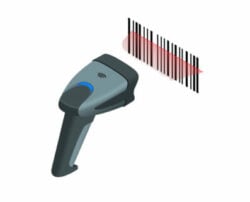
Barcode Scanning at the Point of Sale
MicroBiz supports barcode scanning at the register, allowing retail store owners and staff to quickly add products to a transaction by scanning a barcode rather than manually searching for items. Using any standard USB or wireless barcode scanner, staff can instantly add items to a sale by scanning either a manufacturer's UPC barcode or a custom barcode label printed directly from MicroBiz.
Because MicroBiz is a cloud-based POS system, barcode scanning works on any device with a browser — including Windows PCs, Macs, laptops, Chromebooks, and tablets. There is no special hardware or software installation required to get started.
How barcode scanning works in MicroBiz:
- Scan any manufacturer UPC barcode to instantly look up and add a product to the transaction
- Print custom barcode price labels from MicroBiz and scan them at the register
- Works with any standard USB or wireless barcode scanner connected to your device
- Runs in any web browser on PC, Mac, laptop, Chromebook, or tablet
- No additional software installation required
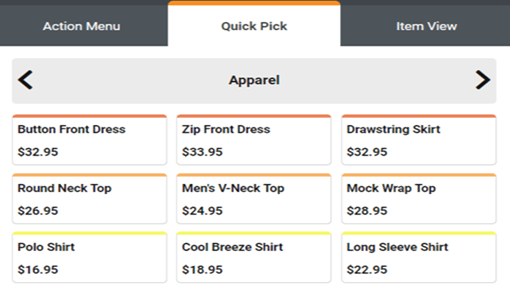
Quick Pick Keys — One-Touch Product Buttons at the Register
MicroBiz Quick Pick Keys allow staff to add products and services to a transaction with a single tap — no barcode scanning or product search required. Keys support both inventory and non-inventory items like service charges, delivery fees, and labor, and can be configured to prompt for price, size, or color at the time of sale.
You can set up an unlimited number of Quick Pick Panels, customize key colors, and arrange keys in any order that fits your store's workflow. Quick Pick Keys help reduce transaction time, minimize staff errors, and keep checkout fast during peak hours.
Complete Set of POS Register Functions
MicroBiz Cloud includes all of the core register functions retail stores rely on day to day, giving staff full control at checkout without needing a separate system or manual workaround for common transaction tasks.
Register functions included in MicroBiz:
- Hold and recall transactions for later completion
- Process voids and corrections at the register
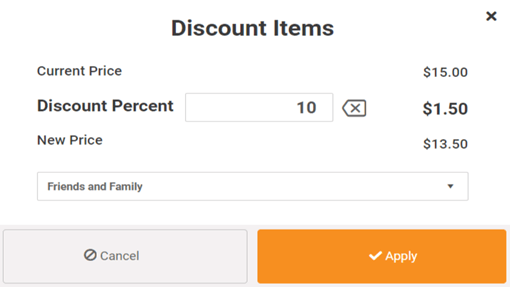
- Apply item-level or transaction-level discounts
- Process returns and exchanges
- Record cash paid in and paid out for till management
- Add notes to a transaction or to individual line items
- Assign a salesperson to an entire transaction or to specific items within it
- Run register close-out and end-of-day reports
Filtered Product Search
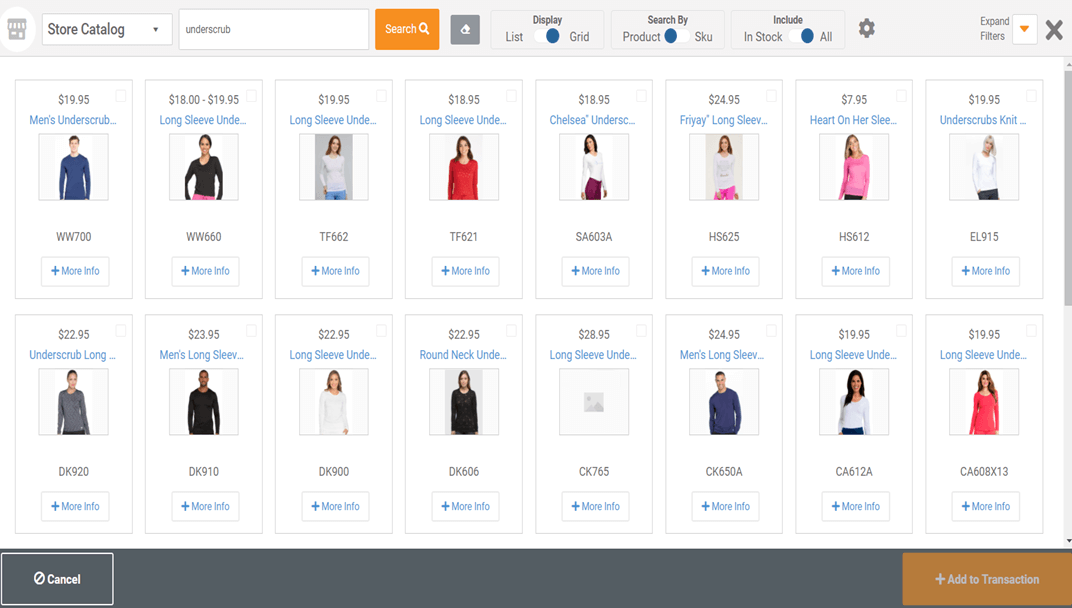
MicroBiz Cloud gives staff multiple ways to find and add products to a transaction beyond barcode scanning. In addition to typing a SKU or product name into the top search bar, MicroBiz includes an advanced filtered search that makes it fast to locate any item in a large catalog.
Filtered search capabilities in MicroBiz:
- Search by product name, SKU, style, UPC, or alternate ID
- View results in table format or as visual product tiles
- Filter results by category, vendor, brand, color, size, or other product attributes
Advanced filtered search is especially useful for retail stores with large or complex catalogs, allowing staff to quickly narrow down results and find the right item — even when a customer doesn't know the exact product name or SKU.
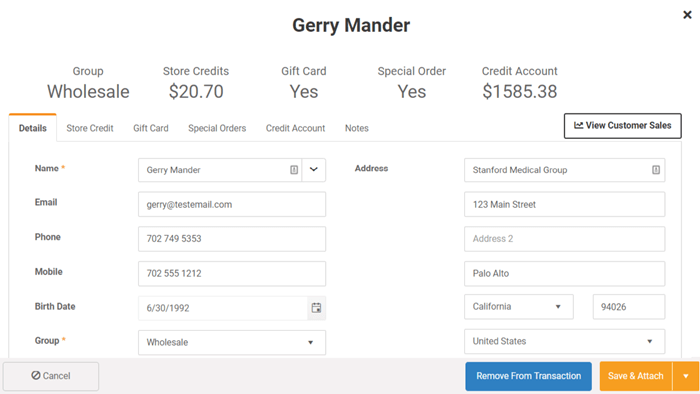
Detailed Customer Profile
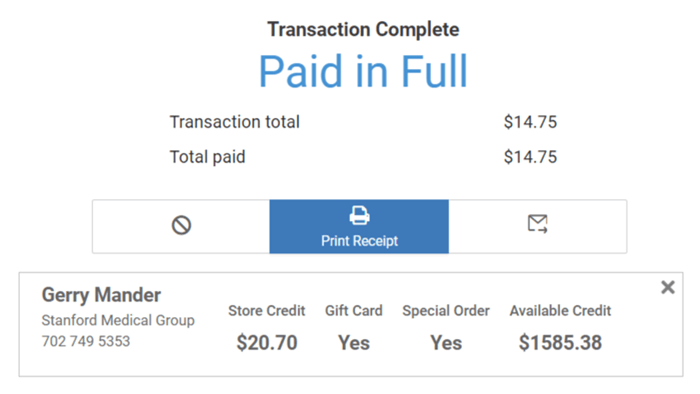
MicroBiz Cloud surfaces a complete customer profile directly at the point of sale, giving staff immediate visibility into everything relevant about the customer attached to a transaction — without needing to look up information in a separate system.
Customer profile information available in MicroBiz:
- Customer pricing group or tier
- Store credit and credit account balance
- Outstanding store credits or gift cards
- Sales history by item purchased
- Sales history by transaction or order
Having this information available at the register allows staff to apply the correct pricing, check available credit before completing a sale, and quickly reference a customer's past purchases — all without interrupting the checkout flow.
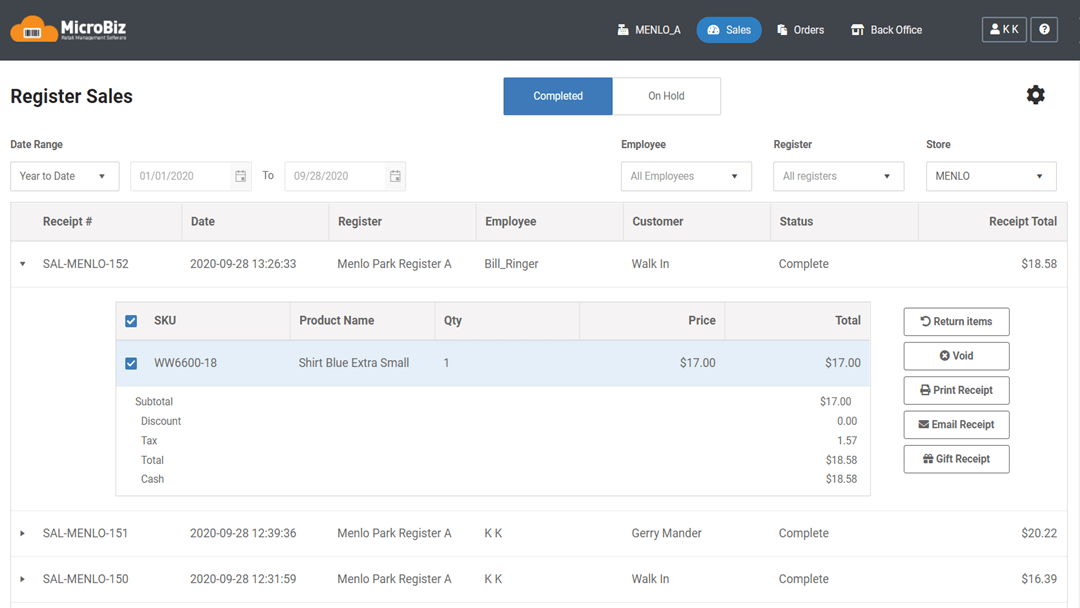
Register Sales Dashboard for Voids and Returns
MicroBiz Cloud includes a register sales dashboard that gives staff a centralized view of transactions on hold and completed transactions, making it easy to look up past sales without searching through paper receipts or relying on memory.
The register sales dashboard allows you to:
- Look up transactions by date range, store, register, or employee
- View transactions currently on hold alongside completed transactions
- Reprint receipts for any past transaction
- Void transactions directly from the dashboard
- Process returns on full transactions or individual items
- Reopen hold transactions to complete a sale that was previously paused
This dashboard is particularly useful for managing voids, returns, and exchanges, since staff can quickly locate the original transaction before processing the correction — giving managers a clear audit trail of register activity across stores and employees.
Customer Facing Display
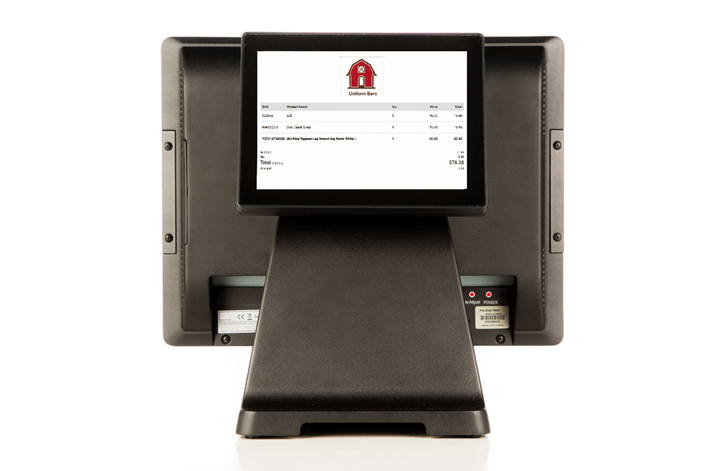
MicroBiz Cloud supports a customer-facing display, allowing retailers to connect a second monitor at the register that customers can view during checkout. This gives customers real-time visibility into their transaction as items are rung up, improving transparency and trust at the point of sale.
Customer facing display features in MicroBiz:
- Displays your store logo and a welcome message when idle
- Shows register items and running totals in real time during a transaction
- Supports custom messages that can be displayed to customers, such as promotions or store announcements
A customer-facing display is a simple way to enhance the checkout experience, giving customers confidence that they're being charged correctly while also providing a small additional touchpoint for branding or promotional messaging.
One-Touch Matrix Product Variant Selection
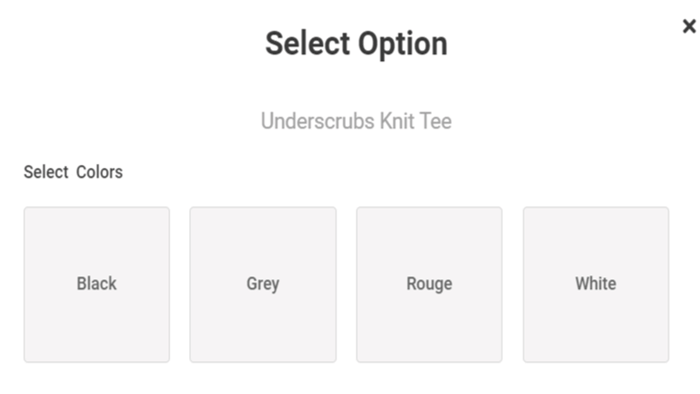
MicroBiz supports the sale of matrix or configurable products, allowing staff to select the specific variant of an item directly at the register rather than searching for a separate product record for each option. This is especially useful for apparel and any product that comes in multiple configurations.
Matrix product support in MicroBiz includes:
- Single-factor variants, such as size only
- Two-factor variants, such as size and color
- Three-factor variants, such as size, color, and an additional attribute
With one-touch variant selection, staff simply tap the matrix product, choose the appropriate size, color, or other attribute, and the correct SKU and price are automatically applied to the transaction — keeping checkout fast and your product catalog organized under a single parent item rather than dozens of individual listings.

Tips and Gratuity
MicroBiz Cloud supports the collection of tips and gratuity directly through the touch screen of an integrated payment terminal, making it easy for service-based retailers to collect tips without a separate system or manual tracking.
How tips and gratuity work in MicroBiz:
- The payment terminal prompts customers to enter a tip based on suggested tip levels
- The tip amount is automatically added to the transaction total
- Tips are itemized and printed on the MicroBiz receipt
- Tips collected and paid out are included in the register closeout report
- A dedicated Tip Audit report in MicroBiz provides detailed tracking of all tips collected
Built-in tip and gratuity support allows retailers offering services such as repairs, installations, or deliveries to collect and track tips accurately, while giving managers full visibility into tip activity through standard closeout and audit reporting.
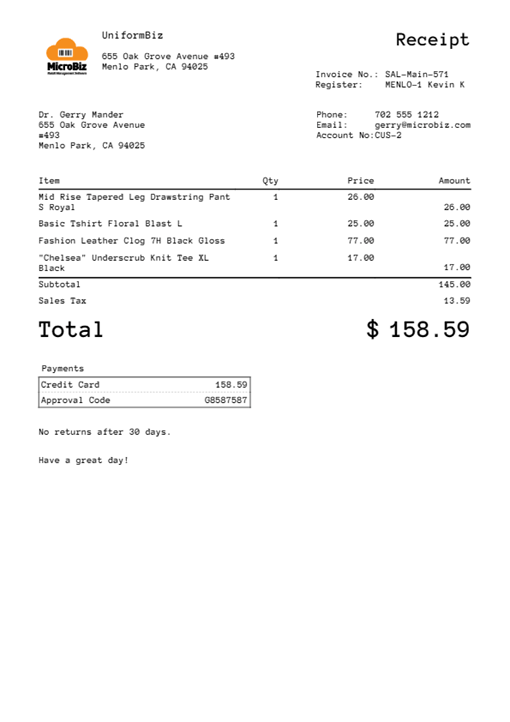
Full Page Invoice-Style Receipts or Standard Register Receipts
MicroBiz Cloud gives retailers the flexibility to choose between two receipt formats depending on the type of transaction. You can print a standard 40-column, 2 1/8 inch register receipt for quick retail transactions, or switch to a full page invoice-style receipt when more space is needed.
Receipt format options in MicroBiz:
- Standard 2 1/8 inch register receipt for fast, compact printing
- Full page invoice-style receipt with room for customer name, itemized purchases, notes, and order summaries
- Toggle between formats directly from the tender screen at the time of sale
This flexibility is especially useful for retailers handling larger transactions, special orders, or work orders that require more detailed documentation than a standard receipt can provide — while still supporting fast, simple receipts for everyday retail sales.
Customer Purchase History
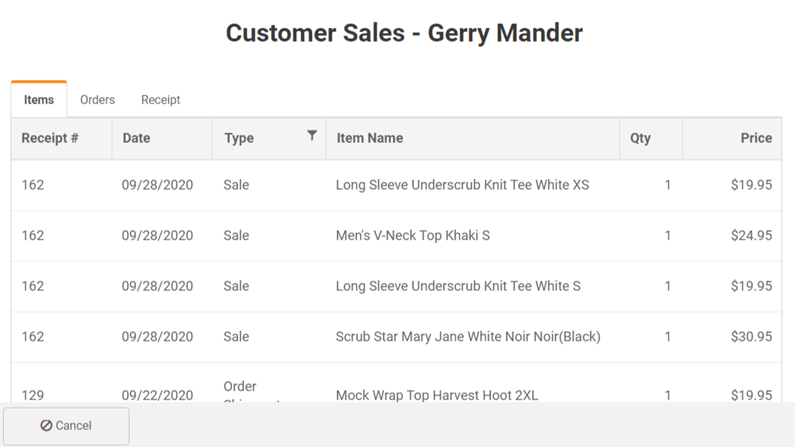
MicroBiz Cloud gives staff instant access to a customer's purchase history directly from the front register, without needing to leave the transaction screen or look up records in a separate system.
Customer purchase history in MicroBiz can be viewed by:
- Individual items purchased
- Register transactions
- Customer orders
The item-level view allows staff to see exactly which products the customer attached to the current transaction has purchased in the past — useful for answering questions about prior purchases, checking warranty or return eligibility, and helping staff make informed product recommendations at the point of sale.
Detailed Product Description / Care Instructions
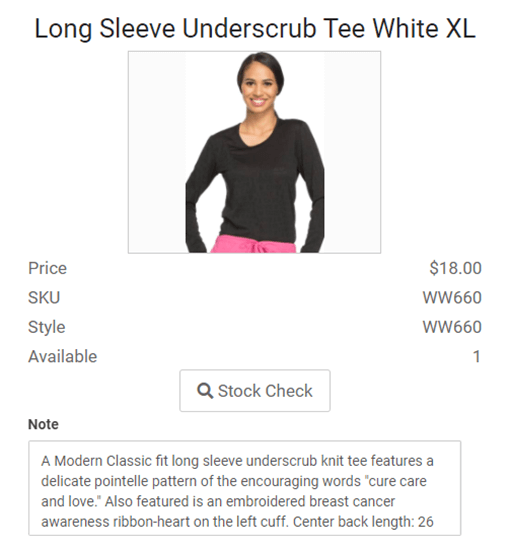
MicroBiz Cloud allows you to add detailed descriptions directly to a product record, which are then visible to staff at the front register during a sale. This gives cashiers easy access to important product information without needing to step away from the register or consult a separate reference guide.
Detailed product descriptions in MicroBiz can be used for:
- Detailed product specifications
- Care instructions
- Installation guides
- Highlighting required or complementary products and services
Having this information available at the point of sale helps staff answer customer questions accurately, ensure proper care instructions are communicated at checkout, and prompt add-on sales for related products or services — all without slowing down the transaction.
Store Credits & Gift Cards
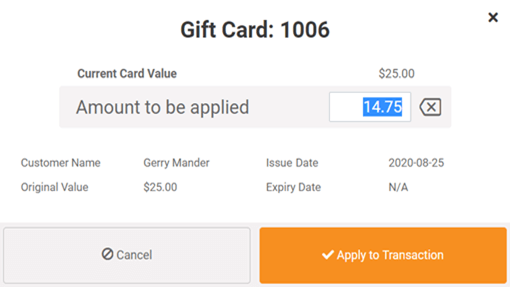
MicroBiz Cloud includes built-in gift card and store credit management, allowing retailers to issue, track, and redeem gift cards in real time across all store locations without relying on an outside payment processor.
Gift card and store credit features in MicroBiz include:
- Issue and redeem gift cards in real time across multiple store locations
- Use standard gift card stock purchased from any third-party vendor — no proprietary cards required
- Sell gift cards in fixed denominations or variable customer-specified amounts
- Issue and track store credits by individual customer and by store
Because gift card tracking is built directly into MicroBiz, retailers avoid the added fees and complexity of a third-party gift card processor, while still maintaining accurate, real-time balances across every location.
Email or Printed Receipts
MicroBiz Cloud gives you the flexibility to print or email receipts to customers at checkout, giving retailers a paperless option while also creating a built-in opportunity to grow a customer marketing list.
Receipt options in MicroBiz include:
- Print or email receipts at the time of sale
- Customize receipts with your store logo, transaction barcode, website address, and a personalized customer message
- Collect customer email addresses at checkout as part of the email receipt process
Offering email receipts not only reduces paper costs but also gives retailers a natural, low-friction way to capture customer email addresses that can be used for outbound marketing campaigns and promotions.
Register Close Outs and End of Day Reports
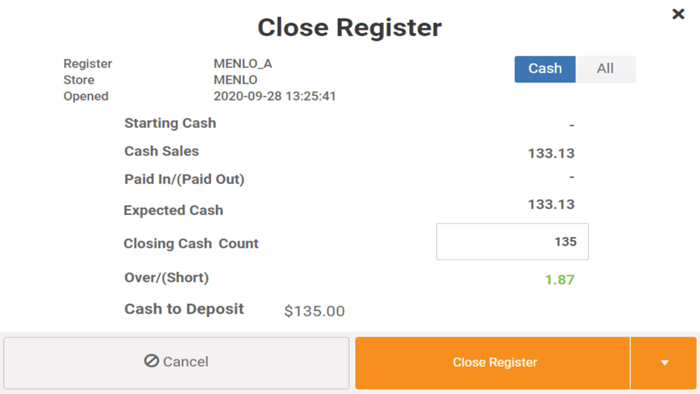
MicroBiz Cloud includes a built-in register close-out process that helps retailers reconcile daily sales against deposits at the end of each shift or business day, giving managers a reliable way to verify that cash and card totals match what was actually rung up.
The register close-out process in MicroBiz includes:
- Batch register transactions at the end of the day for reconciliation
- Set a specified cash amount to keep in the till for the next shift
- Generate a Z report providing a complete daily snapshot
- View salesperson activity, category totals, taxes collected, and tender type breakdowns
This close-out and reporting process gives store owners and managers a clear, auditable record of daily sales activity, making it easier to catch discrepancies early and maintain accurate financial records across one or multiple store locations.
FAQs
Q. How do you bill for extra registers?
A. Your store subscription comes with one front register. Each additional register is billed separately. We do not charge for users accessing the back office functions (purchasing, receiving, customer management, product management, reporting).
Q. Can I run MicroBiz Cloud on my iPhone?
A. MicroBiz Cloud is a web-based application designed to run on a browser on PCs, Mac’s and tablets. The screens are not specifically designed for smart phone screens, so we do not recommend using a smart phone to display our application. But, you can use an iPhone hotspot as an Internet connection.
Q. Do I have to buy specialized hardware from MicroBiz?
A. No, we do not require you to purchase a proprietary hardware system in order to use MicroBiz Cloud. While we do sell POS accessories through our partner POS Portal, you can buy off the shelf hardware from wherever you choose.
.
Want to learn more?
Sign up for a free trial store. No credit card required.
Schedule a one-on-one online demo with a sales rep.
Submit a question or request using a web form.
Or call our sales department at 702 749-5353 option 2