
Automotive Aftermarket Point of Sale
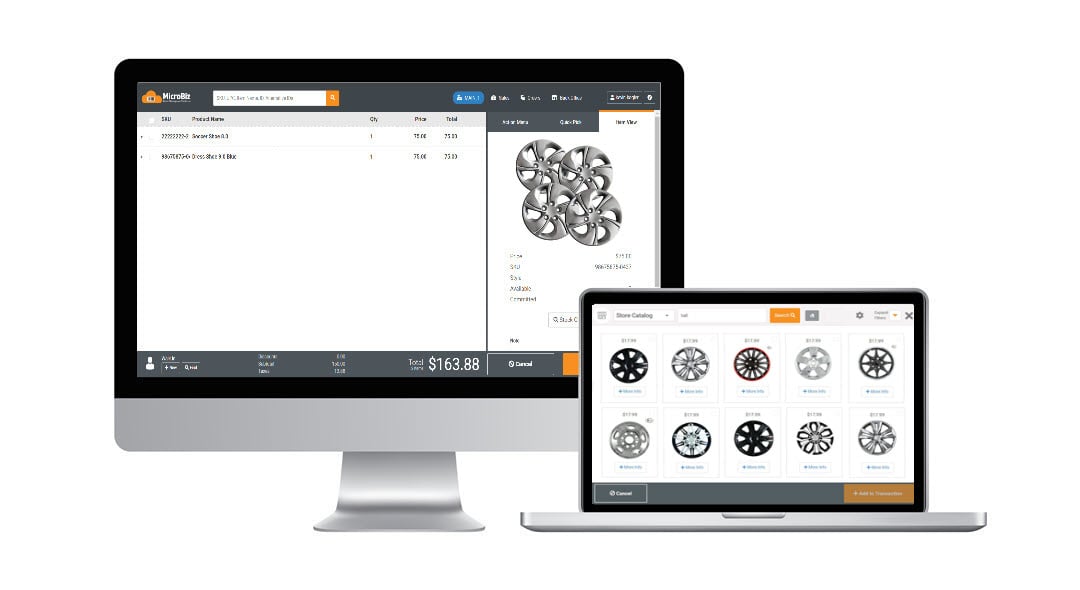
Auto supply or automotive aftermarket retailers stock and sell a wide range of automobile-related products. The best auto supply POS systems manage a large number of inventory items, support multiple price levels for retail and wholesale customers and efficiently manage special orders - or the sale of items not in stock. Many auto parts retailers also offer services and need point of sale software that manages work orders. Automotive aftermarket retailers compete by providing expert advice and superior customer service. Strong customer relationship management features are vital to successfully marketing to customers, such as notifying them when it's time to buy new tires or letting the auto enthusiast know about the latest items for their particular make and model of vehicle
Automotive Aftermarket POS specific features in MicroBiz Cloud include:
Layaways - collect deposits while holding the item out of inventory.
Multiple Checked-in Items - provides ability to manage multiple customer-owned items within a work single customer work order record so you can separately work on multiple vehicles owned by an individual or family.
Quotes and Invoices - with the invoice in progress functionality, you can quote a customer, print the quote, then when the customer comes in to purchase, simply recall the on hold invoice and process the sale.
Markdown management - easily manage group markdowns, quantity pricing, multi-buy items, promotional pricing and bulk discounting.
Service item history - Track and view service history of customer-owned items checked in for service work.
Editable product description on receipts – Ability to edit from the front register the short product description which appears on a receipt. Helpful when selling unique or customizable items.
Barcode scanning and price labels – Scan manufacturer bar codes or use a supported thermal transfer printer to print barcode price labels.
- Flexible tax rules - allows for virtually any taxing scenario including tax exempt products and tax exempt customers.
- Sales commissions - can be calculated for each item based on the sales amount or the gross profit or track commissions by employee to measure productivity.
- Customer-based group pricing or discounts - based on customer level or group.
- Data confidentiality - Complete control and confidentially of your data, unlike systems offered by automotive parts vendors which give your key suppliers complete visibility into the financial performance of your store operations.
- Store credits - issue and redeem customer store credit.
- Email marketing - deliver targeted campaigns by querying and downloading customer data for use with popular email marketing applications.
- Customer deposits - accept and track customer deposits.
- Ecommerce Integration - Integration with WooCommerce allows you to publish product records to Woo!, sync inventory levels and capture online sales of auto-related products in MicroBiz.
Inventory Management
Auto parts and paint retailers often manage catalogs spanning tens of thousands of SKUs across dozens of makes and models — with pricing that can shift the moment a supplier issues a new list. MicroBiz Cloud is built to keep that complexity under control.
Inventory management capabilities in MicroBiz include:
- Connect to an electronic product database of over 1.7 billion product records to quickly add new parts by scanning a UPC or searching by SKU or product name
- Bulk import products, customers, and inventory levels from your existing POS system via CSV or Excel file
- Import bulk vendor price updates via CSV when a supplier releases a new price list
- Print barcode price labels in multiple formats directly from MicroBiz — automatically during receiving or manually for price changes — with support for batch label printing
- Set quantity-based price break points that automatically adjust the price at the register when a purchase threshold is reached
- Set up customer-based pricing tiers — such as retail, wholesale, or body shop accounts — with prices applied automatically at the register when a customer record is attached
- Set reorder points on any part to alert staff when stock of a fast-moving item is running low
- Transfer inventory between store locations and view stock levels across all locations from the register
The payoff shows up at the counter: fewer stockouts on high-demand parts, and pricing that stays consistent whether a customer walks into your main store or a satellite location.


Speed Product Creation with an Online Product Catalog of 1.7+ Billion Records
Adding a new part to the catalog shouldn't mean typing out a description, SKU, and vendor name from scratch. MicroBiz Cloud's connection to an electronic product database of over 1.7 billion records turns that into a scan.
Product catalog lookup capabilities in MicroBiz include:
- Search the database by SKU, UPC, or product name
- Populate a new product record with one click, including part number, UPC/barcode, product description, vendor, brand, and product image where available
- Access product data from hundreds of vendors and brands across multiple retail categories
For a shop adding new parts from multiple manufacturers every week, this turns several minutes of manual entry per item into a single click.
Bulk Add or Update Products and Prices via CSV Import
MicroBiz Cloud allows retailers to add or update large numbers of product records, customer records, and inventory levels in bulk using a CSV or Excel file — eliminating the need to manually create or update records one at a time.
Bulk import capabilities in MicroBiz include:
- Import products, customers, and inventory levels from your existing POS system via CSV or Excel file
- Import bulk price updates when a vendor releases a new price list
This is particularly useful when switching to MicroBiz from another POS system, and for retailers who receive periodic vendor price updates and need to apply new pricing across hundreds or thousands of SKUs at once.
Quotes, Estimates and Invoices
MicroBiz Cloud allows you to generate full page quotes, estimates, or invoices directly from an order record, giving staff the right document type for any stage of the sales process without needing a separate quoting or invoicing tool.
Quote, estimate, and invoice options in MicroBiz include:
- Print a full page quote, estimate, or invoice depending on the current need
- Choose whether order-level or line-level notes are included on the printed document
- Convert a quote into an order with one click to reserve stock and begin collecting payments
One-click quote conversion eliminates re-entering data when a customer is ready to proceed, keeping the sales process fast and accurate from initial estimate through to final invoice.
Print Barcode Price Labels
MicroBiz Cloud supports multiple price tag formats including barcode labels, allowing retailers to print accurate, scannable price tags directly from the POS system without relying on a separate label printing application.
Barcode price label printing in MicroBiz includes:
- Print price tags in multiple formats including tags with barcodes
- Automatically print price tags as part of the receiving process
- Manually reprint tags for individual items when prices change
- Add labels to a print queue for batch printing at a later time
Automatic label printing during receiving is a significant time saver for retailers that process large vendor shipments, ensuring every new item arrives on the shelf already tagged and ready to scan at the register.

Credit Accounts / AR Statements
MicroBiz Cloud includes a full credit account and accounts receivable module that allows retailers to offer house charge accounts to customers, with flexible controls over authorized users, credit limits, and how account balances are managed and reported.
Credit account and AR capabilities in MicroBiz include:
- Define authorized users for each credit account
- Set credit limits and payment terms per customer
- Track current account balance and available credit in real time
- View all charges, payments, and authorized user activity on each account record
- Add service charges such as late fees and issue credits directly to the account
- Bulk print AR statements across multiple accounts
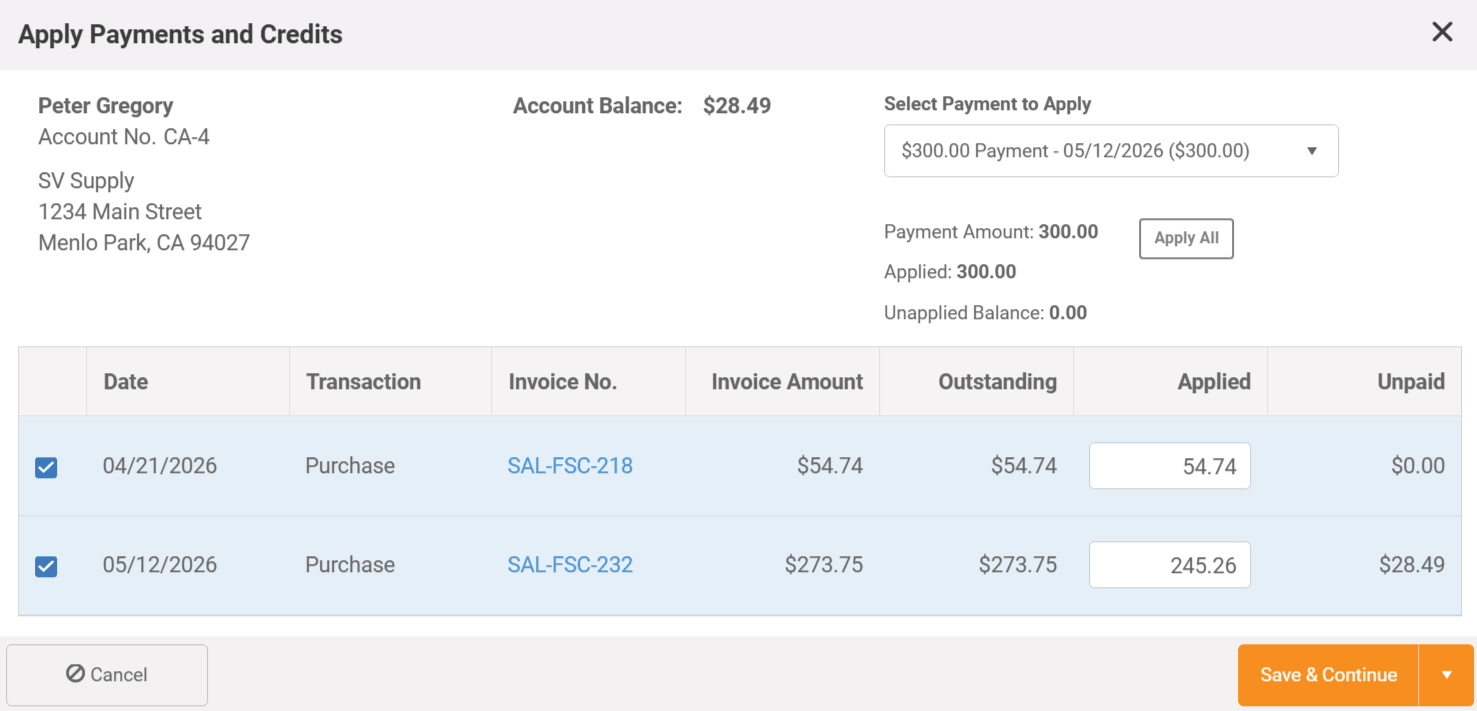
- Choose between balance forward or open item AR — open item AR allows payments to be allocated against specific open invoices rather than applied to the oldest balance
Open item AR is particularly valuable for contractors, commercial customers, and institutional accounts that manage multiple simultaneous orders and need precise control over which invoices are being paid at any given time.
Customer-Based Pricing Levels
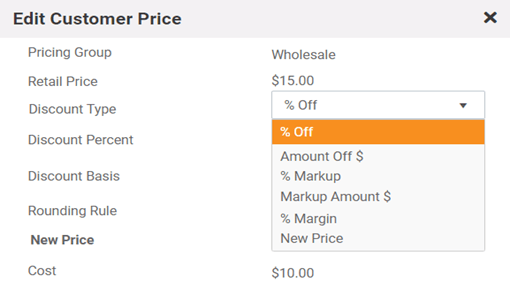
MicroBiz Cloud allows retailers to assign customers to specific pricing groups — such as retail, wholesale, or custom tier levels — so that negotiated or discounted pricing is applied automatically at the register without requiring staff to manually override prices on every transaction.
Customer-based pricing features in MicroBiz include:
- Assign any customer to a pricing group such as retail, wholesale, tier 1, or a custom group
- Prices adjust automatically at the register when a customer record with a special pricing group is attached
- Set up customer tax groups to maintain different tax settings for specific customer types such as non-profits, resellers, or tax-exempt organizations
Customer-based pricing is particularly valuable for retailers serving both retail and trade customers, allowing the same product to be sold at different price points to different customer groups — accurately and automatically — without relying on staff to remember or manually apply the correct discount at checkout.
Special Orders and Backorders
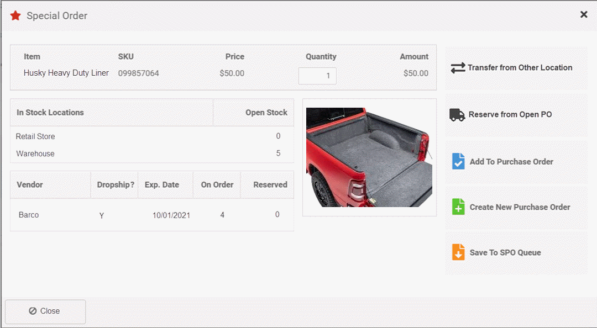
MicroBiz Cloud makes it easy to sell auto parts, truck accessories, and other items not currently in stock, giving automotive aftermarket retailers a structured workflow to take the order, source the item from a vendor, and fulfill the customer's request without losing track of the details along the way.
Special order and backorder capabilities in MicroBiz include:
- Mark any item as a special order at the time of sale, placing it on a dedicated special order list in the purchasing module
- Add the special order item directly to a draft purchase order or create a new PO on the spot
- Receive an automatic alert when the special order item arrives from your vendor
- Special order items are automatically linked back to the original customer order upon receiving
When a special order item is received, MicroBiz immediately alerts staff and links the incoming item to the original customer order — allowing the customer to be contacted right away and the item to be set aside for pickup or shipment without any manual cross-referencing of purchase orders against customer requests.
Sub-Cent Pricing for High-Volume Low-Cost Items
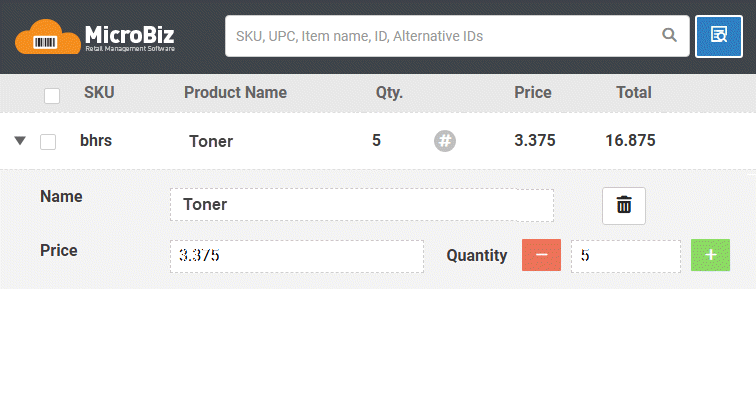
MicroBiz Cloud supports sub-cent pricing, allowing retailers to price products at fractions of a cent for items sold in large quantities where standard two-decimal pricing would result in rounding errors or margin loss.
For example, a product like toner or paint can be priced at $2.1195 per unit — ensuring accurate transaction totals across high-volume purchases without the need to round up or down to the nearest cent.
This is particularly useful for automotive aftermarket and auto paint retailers selling bulk materials, coatings, or chemicals where per-unit pricing extends beyond two decimal places and precision pricing is essential for maintaining accurate margins across large orders.
Repair & Service Department Management
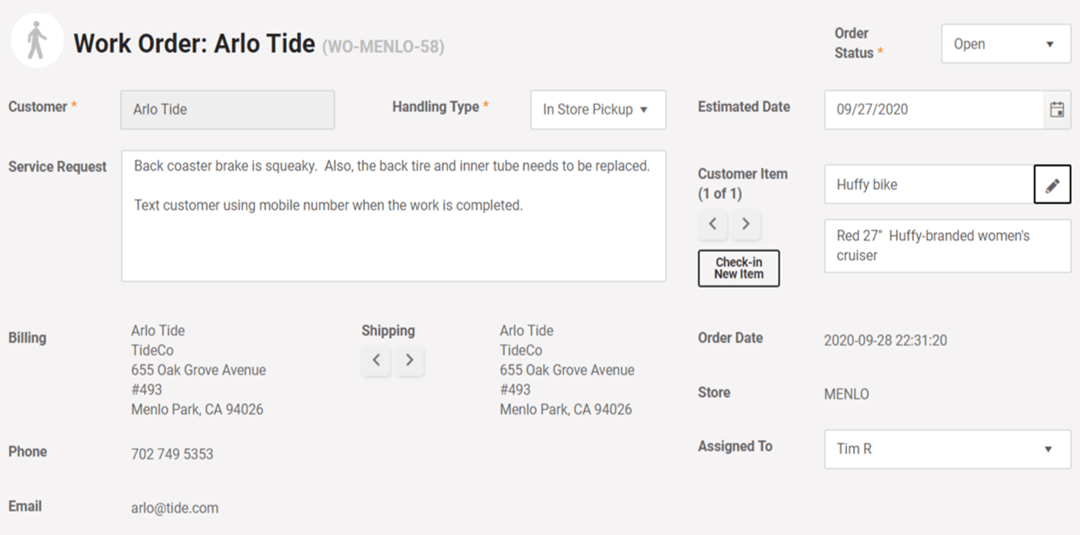
MicroBiz Cloud includes a full work order module that allows automotive aftermarket and auto paint retailers to manage repair and service jobs alongside retail sales from a single system — without needing a separate service management tool.
Repair and service department capabilities in MicroBiz include:
- Record a detailed description of work to be performed on each work order
- Define a handling method for the job
- Print claim tags to attach to the item and provide to the customer at intake
- Assign the job to a specific employee
- Set an estimated completion date to help schedule and prioritize work
- View all customer-owned items and their full service history directly from the customer record
Having repair and service management built directly into MicroBiz gives automotive retailers a complete picture of every customer's service history alongside their retail purchase history — making it easy to reference past work, manage warranties, and provide faster, more informed service when a customer returns.
Other POS Features
In addition to the automotive aftermarket store POS specific capabilities listed above, MicroBiz Cloud includes the following standard features and functionality needed to manage auto parts retailers:
Register
- Register Quick Pick Keys
- Bar code label scanning
- Transaction holds/recalls
- Returns and Voids
- Split Tenders
- Assign Salesperson to Transaction
- Item and Transaction Discount
- Stock-level Look-up (multi-store)
- Store Credits
- Gift Cards
- Customizable Receipts
- Custom Tenders
- Print or Email Receipts
- Customer Sales History Look-up
- Register Close/End of Day Reports
- Integrated Credit Card Processing
- Advanced Filterable Product Search
- Editable Item Descriptions on Receipt
Integrations
- WooCommerce Integration
- QuickBooks Online Integration
Orders
- Phone Orders/Layaways
- Special Orders (out of stock items)
- Pick-up, Shipping, Delivery Dashboard
- Repairs/Service Dept Management
- Quotes/Estimates/Invoices
- Check-in of Customer Items for Repair
- Deposit Collection and Refunds
- Tax Calculation based on Ship Address
- Backorder Creation and Filling
Customers
- Multiple Shipping/Billing Addresses
- Customer Tax Classes/Tax Exempt
- Credit Accounts/Charge to Account
- Accounts Receivable Statements
- Import Customers via CSV File Import
Store Management
- Flexible and Filterable Reports
- Enforceable Business Rules on Discounts, Returns, Deposits
- Employee Roles and Permissions
- Minimum Deposit Requirements
- Store Transfers
- Support of Contactless Payments
- PCI/PA-DS Compliant Payment Processing
Catalog Management
- Customer-based Pricing/Product Pricing Levels
- Product Tax Classes (multiple)
- Quantity-based Tiered Pricing
- Time-based promo pricing
- Alternate Product IDs
- Fractional Sale Quantities (weight/time)
- Matrix Products with Size/Color/Other Variants
- Product images
- Categories and Sub-Categories
- Print Barcode Price Labels
Multi-store Inventory Management
- CSV File Import of Products & Inventory
- Inventory Adjustment Audit Records
- Purchase Orders/Vendor Shipments
- Minimum Inventory Reorder Points
- Special Order Tracking
Expand Functionality of MicroBiz via Integrations with Popular 3rd Party Apps

Publish register batch financials to QuickBooks Online with one-touch
- Map POS financial activities to QuickBooks GL accounts
- Publish register batch financials to QuickBooks with one touch
- Sync revenue, COGS, inventory values, customer liabilities and payments with QuickBooks
- Create QuickBooks invoice payable from received vendor shipments
- Push POS sales taxes to QuickBooks Sales Tax Center for payment management

<< >>

Integrate your POS system with your Woo! ecommerce site
- Link product records and sync changes in product fields from MicroBiz to Woo!
- Automatically adjust stock levels in Woo! for store sales to avoid sales of items not in stock
- Pull online orders into MicroBiz for order and inventory management
- Capture customer records created online in MicroBiz
Sell Your Inventory Online with Our WooCommerce Integration
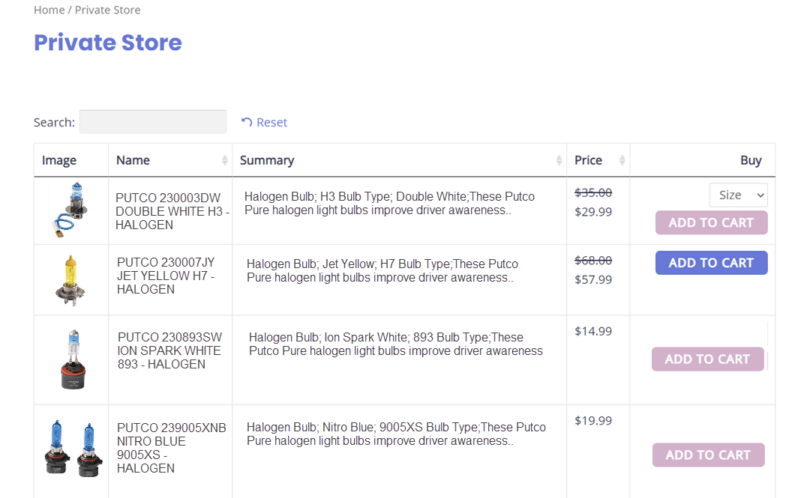
Create customized public or private wholesale ecommerce stores for your best customers using WooCommerce as integrated with MicroBiz. You can offer wholesale pricing for registered customers in a secure password protected private ecommerce site. Display only items curated for a specific customer, such as a fleet manager, corporate customer or restorer. You can completely hide your WooCommerce private wholesale stores from the public, with only your preferred customers being able to access their microsite with a username and password.
The products for sale in the private store can be displayed in an easy-to-use grid format, enabling a wholesale buyer to more easily find products and select variants. You can manage user registration of the employees of your customers - and assign discounts and special prices for items in each private microsite.
Sales in your private online stores are integrated with MicroBiz Cloud, so that online sales are captured and managed in MicroBiz Cloud, and changes in inventory levels sync between your ecommerce site and your store POS/inventory management system.
Frequently Asked Questions
Yes. MicroBiz is designed to manage large product catalogs across multiple categories. You can organize products into categories and subcategories, search by part number or UPC, and import or update large numbers of product records via CSV file. An integrated product catalog with over 1.7 billion items lets you scan a barcode to instantly pull product name, SKU, UPC, and other data into a new product record — making it fast to add new parts and paint products to your inventory.
Yes. MicroBiz provides a real-time centralized view of inventory levels across all store locations and warehouses from any register. You can transfer inventory between locations, set different pricing and costs by store, and manage purchase orders across your entire operation. Multi-store reporting gives you visibility into inventory and sales performance across all locations from one system.
Yes. MicroBiz supports minimum inventory reorder points that help auto-generate purchase orders when stock falls below a set threshold. This ensures you reorder fast-moving parts and paint supplies before running out of stock. When vendor shipments arrive, you can receive them quickly against the original purchase order to keep inventory counts accurate.
Yes. MicroBiz includes a special order module that lets you sell items not currently in stock. You can take a customer order, collect a full or partial deposit, and track the item from the initial sale through receiving and fulfillment. Special orders are automatically linked to vendor shipments when they arrive, and customers can be notified when their order is ready for pickup.
Yes. MicroBiz supports flexible customer-based pricing, allowing you to assign customers to a pricing group — such as wholesale accounts, body shop customers, or loyalty members. Customer pricing can be set as a dollar or percentage discount from retail price, a markup over cost, a target margin, or a negotiated price. Prices are automatically adjusted at the register when a customer record with a special pricing group is attached, so your staff never has to calculate discounts manually.
Yes. MicroBiz includes integrated accounts receivable with full credit account management. You can set credit limits and payment terms for each account, authorize specific employees of a business to charge purchases to their employer's account, and track all charges and payments against the account balance. The system prevents transactions that would exceed a customer's credit limit. You can generate and email full accounts receivable statements showing charges and outstanding balances, making it easy to manage net-30 terms for body shops and wholesale accounts.
Yes. MicroBiz allows you to assign employees to sales transactions and customer orders. Sales are tracked by employee across all locations, providing the data needed to calculate commissions. Reports can be filtered and exported by employee to support your commission calculations and productivity analysis.
Yes. MicroBiz supports printing of invoices, packing slips, and barcode price labels. You can batch print barcode price labels from received purchase orders, making it fast to label incoming parts and paint products. Sales documents can be reprinted at any time. MicroBiz also supports weatherproof barcode price labels using a compatible thermal transfer printer — useful for parts and paint products stored in garages or warehouses.
Yes. MicroBiz has a direct API integration with QuickBooks Online. With one click, you can publish register batch data from all your registers to mapped GL accounts in QuickBooks. When receiving vendor shipments, you can automatically create vendor bill payables in QuickBooks. Sales tax liabilities can also be transferred directly to the QuickBooks Sales Tax Center, reducing manual data entry and keeping your financials accurate.
Yes. MicroBiz supports returns and exchanges, with management settings that allow restrictions to be placed on discounts and returns of specific products. You can control which employees are authorized to process returns, helping to prevent unauthorized returns of electrical parts or opened paint products. Store credits can be issued and linked to a customer record for use on future purchases.
Yes. MicroBiz integrates directly with WooCommerce, the world's most widely used ecommerce platform. You can publish in-store products to your website with a click of a button, and MicroBiz automatically syncs inventory levels between your store and website to prevent overselling. Online orders are pulled into MicroBiz for fulfillment and inventory management, allowing you to manage in-store and online parts sales from a single system.
Want to Learn More?
Try MicroBiz for Free!
Want to test MicroBiz out for yourself? Sign up for a free 21 day trial of MicroBiz including all its features. No credit card required.
Submit a Question or Request
Have a question about MicroBiz software or a request for our sales team? Submit a request directly to MicroBiz using a web form.
or call us at (702) 749-5353 option 2
Schedule One-on-One Online Demo
Want to see how MicroBiz handles workflows or business needs of your store? Schedule a free one-on-one demo with our of our technical sales reps.
Useful Links and Resources:
Auto Care Association — The leading trade association for the $380 billion auto care industry, representing businesses across the entire automotive aftermarket supply chain — from manufacturers and distributors to retailers and service providers. Auto Care provides advocacy, market intelligence, education, and networking resources for its members.
Automotive Aftermarket Suppliers Association — A trade association dedicated to advancing the business interests of automotive aftermarket suppliers. AASA provides industry analysis, strategic insights, government affairs advocacy, and networking opportunities through conferences and peer councils.
Specialty Equipment Market Association (SEMA) — The leading trade association for the $52 billion specialty automotive aftermarket, representing manufacturers, distributors, retailers, auto restorers, restylers, and performance parts specialists. SEMA provides advocacy, business resources, and hosts the annual SEMA Show — the premier trade event for the automotive specialty equipment industry.
Paint, Body and Equipment Specialists (PBES) — A professional community within the Auto Care Association dedicated to businesses in the automotive paint, body, and equipment segment of the aftermarket. PBES provides networking, education, and advocacy specifically for retailers and distributors serving the collision repair and refinish market.
Original Equipment Suppliers Association — A trade association championing the business interests of automotive original equipment suppliers. OESA addresses issues of common concern, advocates for the supplier community in Washington D.C., and fosters collaboration throughout the automotive supply chain.