
Kits and Bundled Items
MicroBiz Cloud supports kits and bundled items. Product bundling, also commonly known as kitting, is a technique where items are grouped or “bundled” together as one product listing or SKU. The product bundle or kit sells as a single unit for a single price that is typically lower than the cost of purchasing each item individually.
Increase revenue by selling items in a value-add bundle or kit
Offer items at a 'kit' or 'bundled' price
Group or bundle multiple items together a separate SKU and sell the bundle at a single price.
Adjust inventory for items sold in a bundle
When you sell an bundled item, MicroBiz takes the individual items sold in the kit out of inventory.
Configure variants sold in bundle at the register
When bundling matrix products in a kit, you have ability to configure variants at the register.
Sell items in fractional quantities in a bundle
Include fractional quantities of kit components in the bundled item.
Build and Sell Bundled Items for a Single Price
MicroBiz Cloud allows you to bundle multiple items into a kit or product bundle, giving retailers an easy way to sell complementary products together at one set price.
Bundle and kit options include:
- Build a kit using simple items, matrix/configurable items, or a mix of both
- Add items at a single unit, multiple units, or fractional quantities, including less than one
- Assign a kit price that's a discount off the sum of the individual component prices
This flexibility allows staff to put together kits and bundles however your products call for it — mixing item types, adjusting quantities down to fractions, and pricing the whole bundle to give customers real value over buying each piece separately.
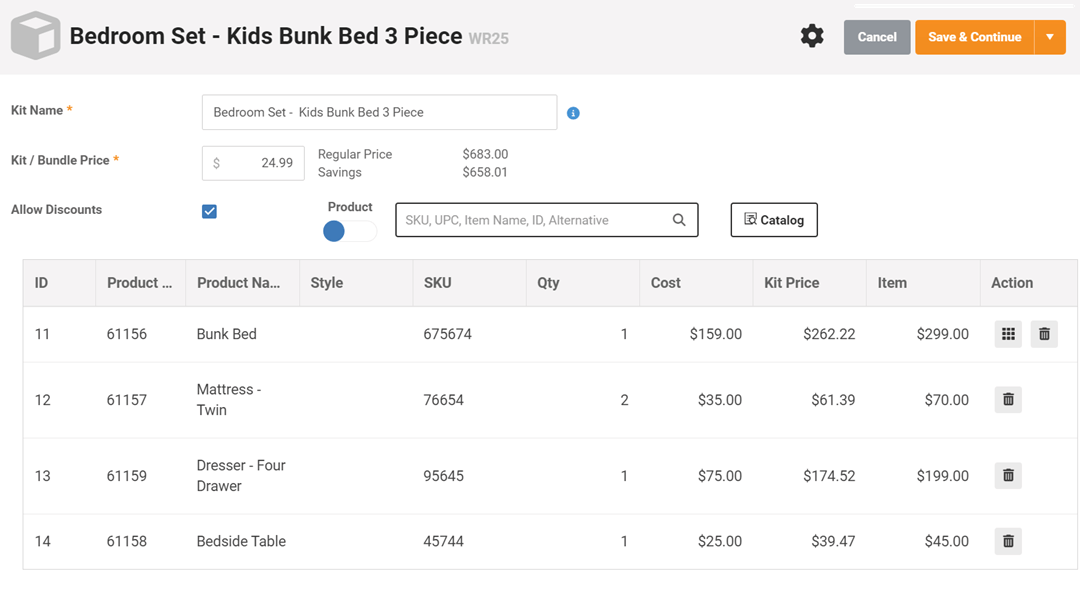
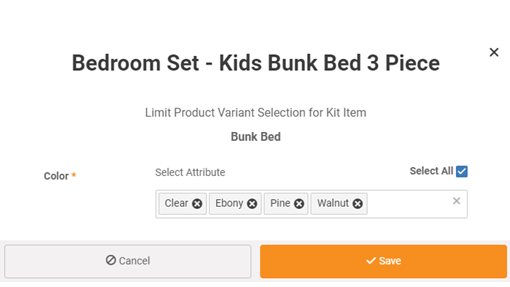
Add Matrix Products to Kit That Can be Configured at the Register
MicroBiz Cloud allows you to add matrix products to a kit at the parent level, giving retailers the flexibility to let customers choose their preferred variant right at the point of sale.
Kit configuration options include:
- Add an individual matrix variant to a kit
- Add the full matrix product to a kit, leaving the variant selection open
- Select the specific variant at the register when the matrix product was added at the parent level
This flexibility allows staff to sell configurable kits — like a furniture set where the customer picks their finish right at the register — instead of having to create a separate kit for every possible variant combination.
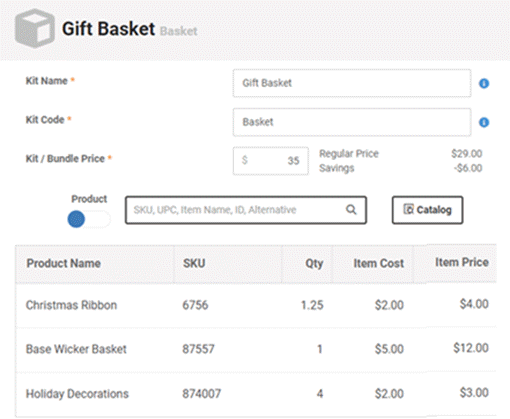
Add Items to a Kit in Fractional Quantities or Quantities less than One
MicroBiz Cloud allows you to add kit components in fractional quantities, giving retailers an accurate way to build bundles using items measured by length, weight, or other partial units.
Fractional kit quantity options include:
- Add a component to a kit using a fractional quantity, such as 4.5 feet of ribbon for a gift basket
- Automatically adjust the component's stock balance by that fractional quantity when the kit is sold
This flexibility allows staff to build kits with real-world quantities — like ribbon by the foot — while MicroBiz keeps inventory accurate by decrementing stock by the exact fraction used every time the kit sells.
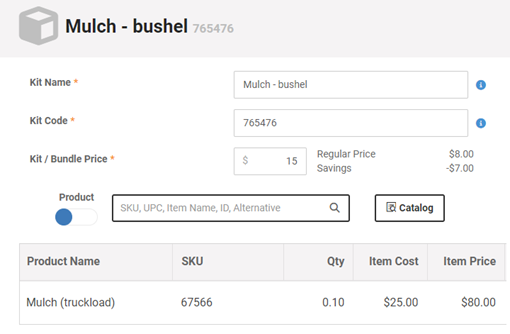
Receive Goods in One Unit of Measure and Sell in Different Unit of Measure
MicroBiz Cloud's kit feature allows you to sell items in a different unit of measure than how you received them, giving retailers an easy way to break down bulk inventory into the units customers actually want to buy.
Unit of measure conversion options include:
- Create a kit product representing a smaller selling unit (such as a "bag") that's a fractional quantity of the larger received unit (such as a "bushel")
- Automatically adjust the inventory level of the larger unit by the fractional quantity whenever the smaller unit is sold
- Apply this approach across all sorts of units of measure
This flexibility allows staff to receive and stock items however they come from the vendor — by the bushel, case, or roll — while still selling in smaller, customer-friendly units, with MicroBiz keeping inventory accurate behind the scenes.
Manufacture Items Sold from Component Products
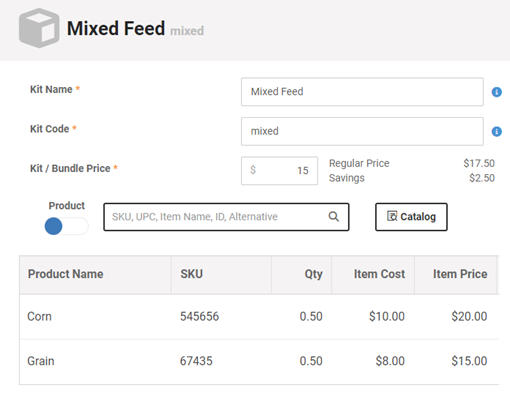
MicroBiz Cloud's kit/bundle feature allows you to create items sold from component products, giving retailers an easy way to sell custom mixes or blends without managing a separate manufacturing process.
Mixed product options include:
- Create a kit made up of fractional quantities of multiple components, such as 0.5 units of Component A and 0.5 units of Component B for a 50/50 mix
- Automatically adjust the inventory of every component by its fractional quantity when the mixed product is sold
This flexibility allows staff to sell custom paint, chemical, feed mixes, or any other blended product as a single item at the register, while MicroBiz keeps the inventory of every individual component accurate behind the scenes.
Why Bundle Your Products?
Bundling your products is one of the most effective ways to increase average order value and grow your store's revenue. Product bundles help merchants upsell and cross-sell to customers, encouraging them to add more to their order in exchange for a more convenient or better overall deal — and "better deal" doesn't have to mean a discount; it can simply mean added value through complementary products.
Bundling creates countless upselling and cross-selling opportunities, and those deals can also build long-lasting, loyal customer relationships — increasing the chances customers come back to your store again and again.
Popular ways to bundle products include:
- Kits — a gardening "starter kit" with seeds, garden gloves, and a clay pot
- Multipacks — a "3-pack" of cotton T-shirts, or a "5-pack" of long sleeve tees
- Tiered products — a "Basic" gift basket vs. a "Premium" gift basket
- Boxes — a gift box or subscription box
- Mix and match — a "Christmas Wreath" with different color ornament options
FAQs
Q. Can I add an item to a kit with a quantity less than one?
A. Yes, you can add a fractional quantity of an item to a kit. For example, a wreath package that contains 3.5 feet of ribbon or a custom mix of feed that contains 0.5 bushels corn and 0.5 bushels of wheat grain.
Q. Can a kit contain a serialized item?
A. Yes, you can include a serialized item in a kit.
Q. Can I configure item in a kit at the register?
A. Yes, if you add a configurable product to kit/bundle, MicroBiz will prompt you to select the attribute (size, color, length, weight) at the register.
Q. Do reports show the kits sold or the lit items sold?
A. The sales and inventory reports do not show the kits as separate items. The sales and inventory reports show the items in the kit individually. However there is a separate 'Kit Report' that shows sales activity of the kit product records.
Want to learn more?
Sign up for a free trial store. No credit card required.
Schedule a one-on-one online demo with a sales rep.
Submit a question or request using a web form.
Or call our sales department at 702 749-5353 option 2