
GUN STORE POS SOFTWARE
Improve your operations with a cost effective POS/inventory management system made for gun stores by MicroBiz
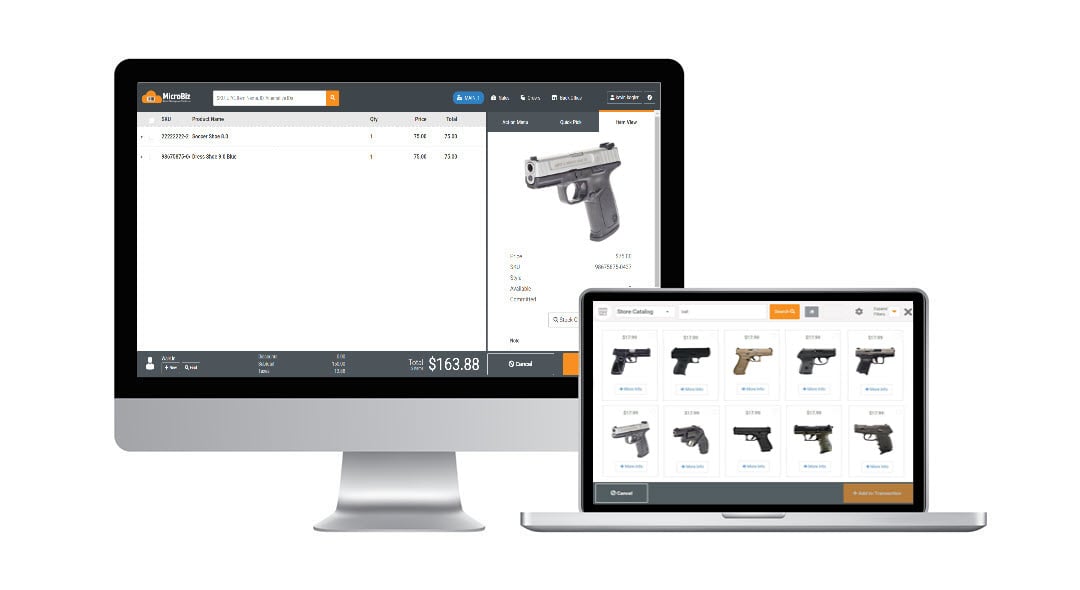
Gun stores specialize in the sale of firearms, ammunition and related accessories. The best gun store POS systems tightly track inventory, manage the sale of firearm items and capture and maintain the identity of customers for entry into FFL A&D compliance software. Firearm and ammunition stores can range in size from very small niche shops focusing only on firearms, to shooting ranges, to larger outlets that often sell related merchandise such as hunting gear or hardware. Key features of POS software for FFLs include:
- Integration with electronic bound book
- Connections with firearm vendor catalogs
- Serial number tracking
- Gun range management
- Workorder/gunsmithing management
- Management of Trade-ins
- Mobile sales for gun shows
- Integration with 'firearm-friendly' payment processor
- Integration with WooCommerce/WordPress and FFL Cockpit plugin
- Layaways
- Special Orders
- Email marketing and automated campaigns
Streamline Regulatory Tasks with POS Integration to FastBound A&D Software
MicroBiz's POS Integration with FastBound supports all critical workflows of gun stores
Acquisitions
When you add firearms to inventory in MicroBiz, you can create an acquisition in FastBound with one click. MicroBiz will send FastBound all required ATF information to FastBound, including the model, name, serial number and all other required ATF data.
Trade Ins
Dispositions/4473 Forms
When selling a firearm to a customer MicroBiz, you can start a 4473 registration process in FastBound with one click. MicroBiz will match the serial number of the item being sold and customer to a record in FastBound - and start a disposition in FastBound.
Gunsmithing
When a customer drops off a firearm for gunsmithing, you can create an acquisition in FastBound directly from the work order record for the firearm brought in for gunsmithing. When the customer comes to pick up the firearm, you can also start a disposition directly from the MicroBiz work order. Just press the 'Dispose Item' button and MicroBiz will create a pending disposition in FastBound and provide a link directly to the disposition record in FastBound.
Dealer Transfers
When receiving the transfered item, you can automatcally create an acquisition of the transferred item in FastBound without adding it to your store inventory. When the buyer comes to pick up the firearm, you can charge a dealer transfer fee and then automatically start a disposition/4473 in FastBound directly from the MicroBiz work order.
Looking for more information on the FastBound integration?
For more information on the FastBound integration and how it can automate your workflows at your gun store, please click here.
Firear Vendor Catalogs: Compare Real-time Prices and Availability Across All Your Firearm Vendors in Seconds
PriceCompare is a real-time pricing and availability comparison engine that allows you to search across all your connected firearm distributors for real-time pricing and availability. This application eliminates the need to log into vendor portal sites one-by-one to see if a product is in stock and obtain your pricing based on your account status.
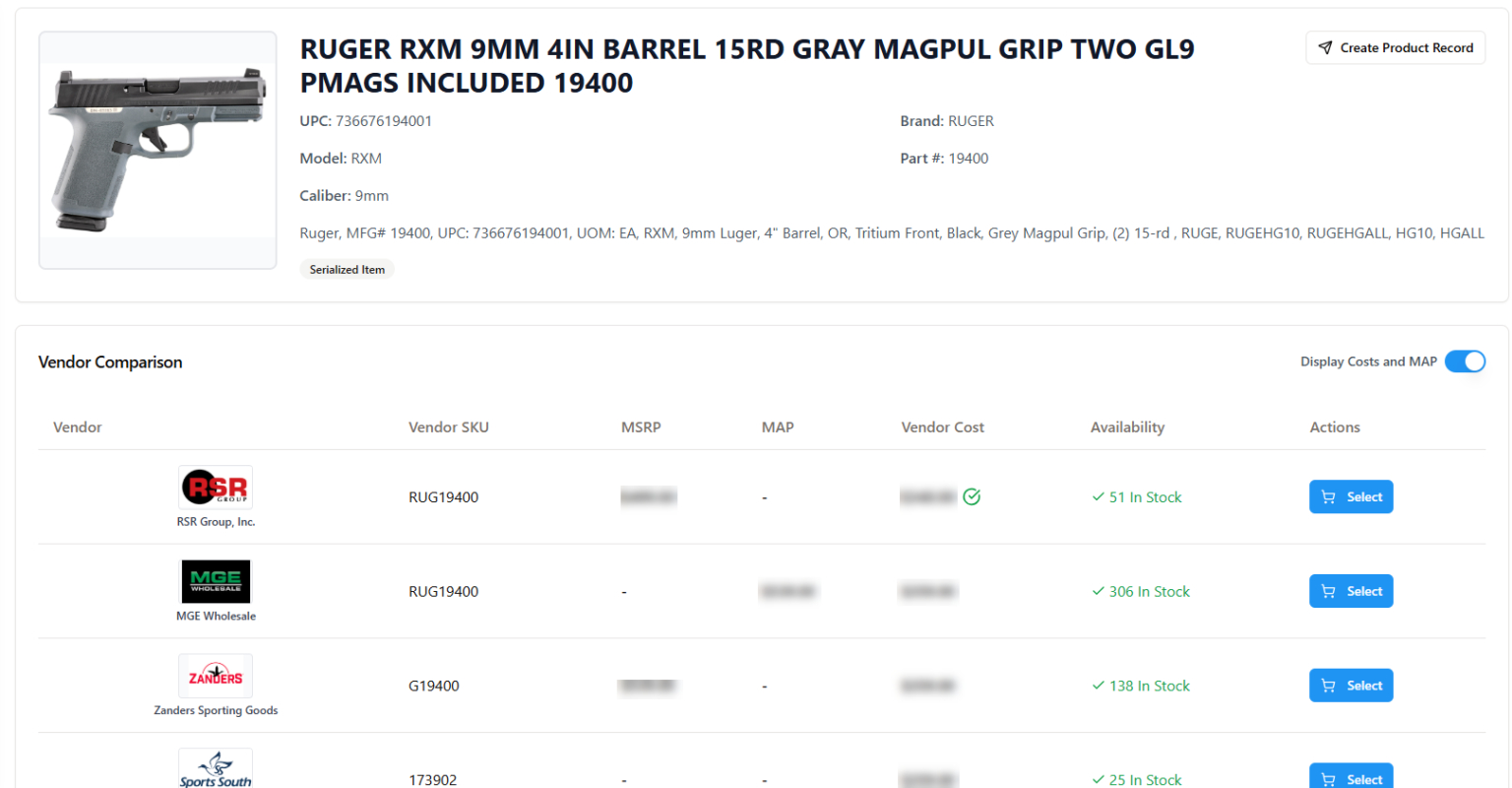
PriceCompare allows you to search for products by UPC, name, or manufacturer part number. PriceCompare will search across all your vendor catalogs and return values for any vendor that carries the item. Information displayed includes:
- Name
- Description
- IDs (UPC, part number, vendor SKU_
- Gun-specific information
- Image
Pricing and availability displayed is based on the API credentials that you enter into PriceCompare.
Available Connections with Firearms Distributor Catalogs
MicroBiz connects with the following firearm vendor catalogs based on your online or API credentials.
| Vendor | Real-time Prices | Vendor Stock | Online Ordering | |
|---|---|---|---|---|
 | Lipsey's | Yes | Yes | Yes |
 | Sports South | Yes | Yes | Yes |
 | Chattanooga | Yes | Yes | Yes |
 | RSR | Yes | Yes | Yes |
 | Zanders | Yes | Yes | Yes |
 | Davidson's | Yes | Yes | Yes |
 | Bill Hicks | Yes | Yes | Yes |
 | Iron Valley | Yes | Yes | Yes |
 | Orion Wholesale | Yes | Yes | No |
 | Camfour | Yes | Yes | No |
 | Kinsey's Inc. | Yes | Yes | No |
 | AmChar Wholesale | Yes | Yes | No |
 | MGE Wholesale | Yes | Yes | No |
 | Allen Arms Tactical | No | Yes | No |
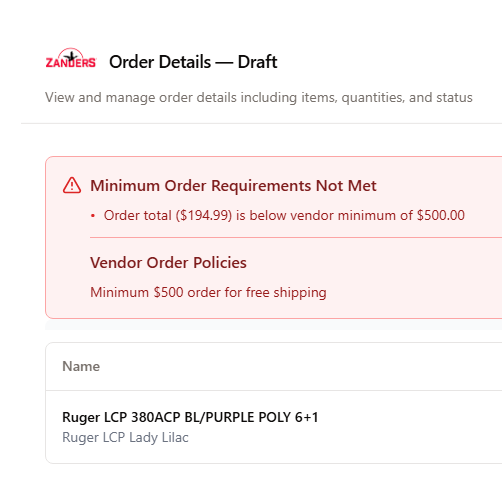
Build Vendor Orders with Searched Products
Once you have found the lowest price, you can build an order for that vendor. There are settings for minimum order quantities that will display an alert if these minimum are not met.
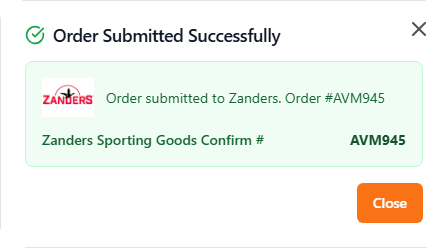
Submit Orders Electronically
If supported by the vendor, you can submit your order electronically from PriceCompare with one click. This will send order and item details to the vendor, including any item or order notes.

Obtain Updated Ship info
Once an order is submitted, you can obtain updated ship information including allocation, ship method and tracking number. When the order is submitted, a purchase order in MicroBiz along with product records for any items not already in your MicroBiz catalog.
Track Serial Numbers on Items Received and Sold
MicroBiz Cloud supports full serial number tracking for serialized inventory, allowing retailers to capture, manage, and look up serial numbers at every stage — from receiving through to the point of sale.
Serial number tracking capabilities in MicroBiz include:
- Set any product as serialized with serial number tracking required or optional
- Capture serial numbers when items are received into inventory, from the product record, or at the point of sale
- Scan serial number barcodes for fast and accurate data entry
- View serial number records for both sold and unsold inventory
Serial number tracking in MicroBiz is particularly valuable for retailers selling high-value items such as electronics, appliances, power equipment, sewing machines, pool equipment, and firearms — giving stores a complete audit trail from receiving to sale for every serialized unit.
For more information on serial number tracking, click here.
Manage Gunsmithing with Work Orders
MicroBiz Cloud allows firearms retailers to manage gunsmithing and repair services using the same order management system used for retail sales, giving gun stores a single platform to handle both product sales and service work without a separate system.
Gunsmithing work order capabilities in MicroBiz include:
- Check in customer firearms and print claim tags at intake
- Enter a description of work to be performed and add service notes
- Print full page quotes and invoices showing due dates, parts and service charges, and amount due
- Collect deposits at intake and enforce minimum deposit rules
- Assign the job to a specific employee or gunsmith
- Manage order fulfillment through the Order Management portal for pickup, delivery, or shipment
- View all items a customer has brought in for gunsmithing from their customer record
- Access the full service history for each individual firearm
With complete work order management and customer-level service history built directly into MicroBiz, gun store owners can run a professional gunsmithing operation with full visibility into every job — from intake through to customer pickup.
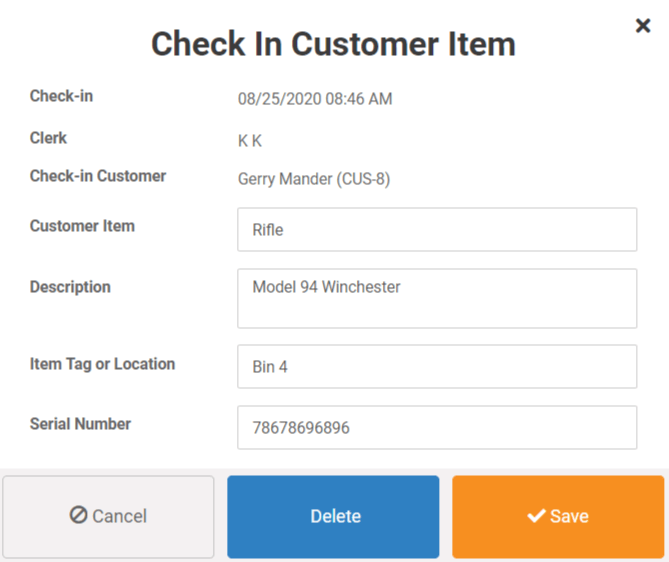
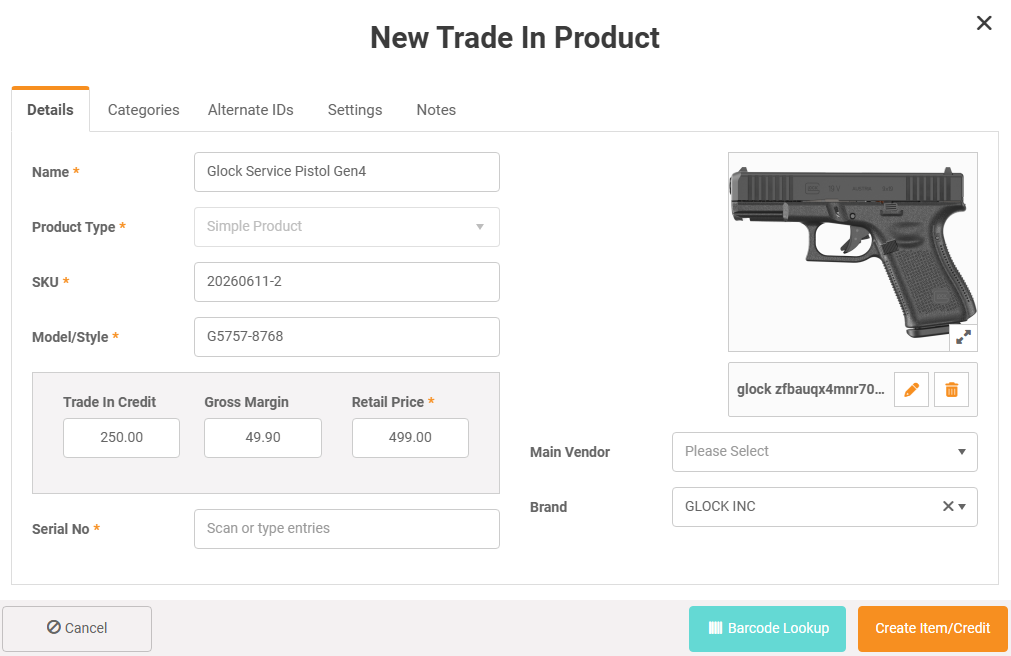
Manage Trade-In of Used and Vintage Firearms
MicroBiz Cloud allows firearms retailers to process trade-ins of used and vintage firearms directly at the front register, without interrupting the current transaction or switching to a separate system.
Firearms trade-in capabilities in MicroBiz include:
- Create a trade-in item on the fly at the register, including serial number capture
- Push the trade-in directly to Fastbound as a pending acquisition without leaving the register screen
- Apply the trade-in value to the current sale as a transaction credit
- Issue the trade-in value as a store credit for future purchases
- Distribute the trade-in value as a cash payout to the seller
By connecting the trade-in process directly to Fastbound from the register, MicroBiz eliminates the need for double data entry on firearm acquisitions — keeping your bound book accurate and your compliance workflow intact while allowing staff to complete the entire trade-in and sale in a single seamless transaction.

Connect Your POS to WooCommerce and the FFL Cockpit Plugin to Sell Your Store Inventory Online
MicroBiz Cloud connects to your WooCommerce website in minutes using a simple integration wizard, allowing firearms retailers to manage in-store and online inventory from a single system — with no manual syncing or double data entry required.
WooCommerce integration capabilities in MicroBiz include:
- Publish new products, price updates, and inventory changes to your WooCommerce site automatically
- Capture online transactions instantly in MicroBiz's order management module, including customer record, items sold, and payment
- Send real-time stock updates to WooCommerce when an item sells in-store — minimizing the risk of selling an out-of-stock item online
- Publish in-stock store inventory to WooCommerce alongside new items from your firearm distributor feeds managed through the FFL Cockpit plugin
- Manage inventory across your physical store and online operations from one platform
By combining MicroBiz with WooCommerce and the FFL Cockpit plugin, firearms retailers can run a fully integrated brick-and-mortar and ecommerce operation — keeping inventory accurate across both channels and fulfilling online orders through the same order management workflow used for in-store sales.
To learn more about how to build a gun store ecommerce site using WooCommerce, click here.

Ring Up Sales at a Gun Show Using a Mobile POS Store
MicroBiz Cloud's browser-based design makes it easy to set up a fully functional mobile POS at a gun show, trade show, or pop-up location — using nothing more than a standard laptop, Chromebook, or tablet and an internet connection.
Mobile POS capabilities in MicroBiz include:
- Run a complete POS register from any laptop, Chromebook, or tablet
- No software installation, product downloads, or special setup required
- Log in to your existing MicroBiz subscription from any temporary location and start selling immediately
- Access your full product catalog, customer records, and inventory in real time
Because MicroBiz is cloud-based, your gun show or pop-up store operates on the same system as your main retail location — meaning inventory levels, customer records, and sales data stay synchronized across all locations automatically, with no manual reconciliation needed after the event.
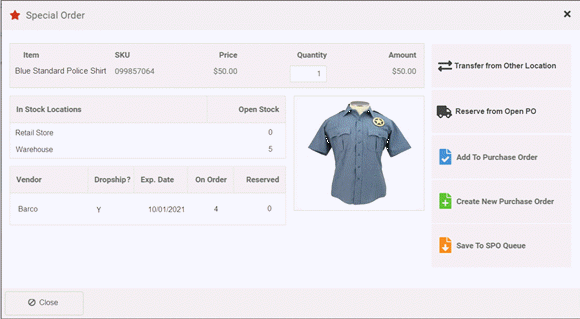
Special Order Firearms and Out of Stock Items
MicroBiz Cloud supports the sale of firearms and other items not currently in stock, giving gun store owners a structured workflow to take the order, source the item from a distributor, and fulfill the customer's request without losing track of the details along the way.
Special order capabilities in MicroBiz include:
- Mark any item as a special order at the time of sale
- Add the special order item directly to a draft purchase order or create a new PO on the spot
- Receive an automatic alert when the firearm or special order item arrives from your distributor
- Special order items are automatically linked back to the original customer order upon receiving
When a special order item is received, MicroBiz immediately alerts staff and links the incoming item to the original customer order — allowing the customer to be contacted right away and the item to be set aside for pickup or shipment without any manual cross-referencing of purchase orders against customer requests.

Manage Layaways and Installment Sales with the Customer Orders in Progress Module
MicroBiz Cloud's Orders in Progress module gives firearms retailers a structured way to manage layaway sales and installment purchases, allowing customers to reserve a firearm with a deposit and pay over time before taking possession.
Layaway and installment sale capabilities in MicroBiz include:
- Add any item to a layaway order and attach a customer record
- Collect full payment or a partial deposit at the time the order is placed
- Set an expected pickup date for the order
- Enforce minimum deposit rules at the store level
- Add notes directly to the layaway order for staff reference
Items attached to a layaway or phone order are automatically moved from open stock to committed stock, ensuring the firearm or item is reserved for the customer and not available for sale to someone else while the order is in progress. This gives gun store owners accurate inventory counts while still honoring reserved items for customers paying in installments.

Gearfire Payments manages the payments for over 2000 firearms businesses. GearFire Payments provides gun stores EMV enabled credit card terminals, integrated firearm POS credit card processing, and mobile processing solutions for tablets and smartphones. Gearfire also offers credit card processing for firearm eCommerce sites and online Firearm auctions.

Founded in 2003, Payroc processes over $93 billion annually for more than 158,000 merchants and over 30,000 clients. Payroc offers a variety of payment processing options, including omnichannel, in-person, online, and on-the-go. Payroc's terminals can accept all card types, including contactless, EMV, magstripe, and digital wallets.
Looking for more information on firearm friendly payment processing options?
Other POS Features for Gun Stores
In addition to the Ammunition and Firearms POS specific capabilities listed above, MicroBiz Cloud includes the following standard features and functionality needed to manage a gun store:
Register
- Store Credits
- Gift Cards
- Customizable Receipts
- Custom Tenders
- Print or Email Receipts
- Customer Sales History Look-up
- Register Close/End of Day Reports
- Integrated Credit Card Processing
- Advanced Filterable Product Search
- Editable Item Descriptions on Receipt
- Register Quick Pick Keys
- Bar code label scanning
- Transaction holds/recalls
- Returns and Voids
- Split Tenders
- Assign Salesperson to Transaction
- Item and Transaction Discount
- Stock-level Look-up (multi-store)
Integrations
- WooCommerce Integration
- QuickBooks Online Integration
- Zoho Campaigns (email marketing)
Catalog Management
- Product Tax Classes (multiple)
- Quantity-based Tiered Pricing
- Time-based Promo pricing
- Alternate Product IDs
- Fractional Sale Quantities (weight/time)
- Print Barcode Price Labels
- Customer-based Pricing/Pricing Tiers
- Matrix Products with Size/Color/Other Variants
- Product images
- Categories and Sub-Categories
Multi-store Inventory Management
- CSV File Import of Products & Inventory
- Inventory Adjustment Audit Records
- Purchase Orders/Vendor Shipments
- Minimum Inventory Reorder Points
- Special Order Tracking (ties vendor shipment to customer order)
Orders
- Quotes/Estimates/Invoices
- Check-in of Customer Items for Repair
- Deposit Collection and Refunds
- Tax Calculation based on Ship Address
- Backorder Creation and Filling
- Phone Orders/Layaways
- Special Orders (out of stock items)
- Pick-up, Shipping, Delivery Dashboard
- Repairs/Service Dept Management
Customers
- Multiple Shipping/Billing Addresses
- Customer Tax Classes/Tax Exempt
- Credit Accounts/Charge to Account
- Accounts Receivable Statements
- Import Customers via CSV File Import
Store Management
- Store Transfers (multi-store)
- Support of Contactless Payments
- PCI/PA-DS Compliant Payment Processing
- Flexible and Filterable Reports
- Enforceable Business Rules on Discounts, Returns
- Employee Roles and Permissions
- Minimum Deposit Requirements
Integrations with Leading Applications Used by Gun Stores

The integration with FastBound A&D compliance software eliminates the need to manual enter regulated firearm data in two systems. When you receive a firearm into inventory in MicroBiz, you can create an acquisition record in FastBound with one click. MicroBiz POS will send FastBound all required ATF data automatically and accurately. When selling a firearm, MicroBiz can start a 4473 registration process in FastBound with one click.

Publish register batch financial information from MicroBiz POS to QuickBooks Online with a press of a button. No more downloading and uploading of files, faxing or emailing spreadsheets or manually reconciling financial data between your retail system and accounting software. All your register batch data is seamlessly published to QuickBooks Online quickly and accurately.

The WooCommerce POS interface syncs MicroBiz inventory with the WooCommerce ecommerce platform - helping you to manage inventory across your stores and ecommerce site. You can also publish products to be sold online with one cliick. This inventory syncs minimizes the potential of selling an item online that is no longer in stock. WordPress is free open source software, and is a perfect compliment to MicroBiz POS's affordable gun store POS system.
Frequently Asked Questions
MicroBiz integrates with the popular FastBound A&D software application. This seamless integration allows you to sync acquisitions, dispositions, trade-ins, dealer transfers, and gunsmithing transactions with FastBound.
MicroBiz supports integrations with two gun-friendly payment processors: Payroc, and GearFire Payments. Both these integrated partners specialize in processing payments for firearms businesses.
Yes, through the PriceCompare add-on, you can have integrations with 14 major firearm distributors, including Lipseys, Sports South, Davidson's, Chattanooga, RSR, and Bill Hicks. These integrations support real-time pricing, vendor stock availability, and online ordering. You can also retrieve shipping information on submitted vendor orders.
Yes, MicroBiz integrates with the open source WordPress WooCommerce platform. This allows you to publish in-store items to your e-commerce site with a click of a button. MicroBiz also syncs inventory and online sales to prevent the sales of item that are out of stock in your store.
Yes, as part of the startup process, the MicroBiz support team can import Firearm products from your FastBound subscription into MicroBiz as product records. Fields inported include the product name, part number/UPC, model number and price.
MicroBiz does not have a direct integration with GunBroker. However, if you use our integration with WooCommerce, there are several plugins that allow you to publish items from your WooCommerce site to various online marketplaces, including GunBroker. You can also use the FFL Cockpit plugin to connect your integrated WooCommerce firearm e-commerce site to all major firearm distributors. This will enable you to manage dropshipping of items purchased from distributors.
Yes, MicroBiz manages layaways via open orders. You can start an open order, reserve the stock for the customer, collect a deposit, or multiple deposits over time. When the customer comes to pick up the item, you can quickly collect the balance and complete a sales transaction..
Want to Learn More?
Try MicroBiz for Free!
Want to test MicroBiz out for yourself? Sign up for a free 21 day trial of MicroBiz including all its features. No credit card required.
Submit a Question or Request
Have a question about MicroBiz software or a request for our sales team? Submit a request directly to MicroBiz using a web form.
or call us at (702) 749-5353 option 2
Schedule One-on-One Online Demo
Want to see how MicroBiz handles workflows or business needs of your store? Schedule a free one-on-one demo with our of our technical sales reps.
Useful Links and Resources:
National Shooting Sports Foundation (NSSF) — The firearms industry's leading trade association, representing thousands of manufacturers, distributors, firearms retailers, shooting ranges, and sportsmen's organizations nationwide. NSSF provides advocacy, compliance resources, market research, and education programs to support the business interests of the firearms industry.
SHOT Show — The Shooting, Hunting and Outdoor Trade Show is the largest and most comprehensive trade show for professionals in the shooting sports, hunting, and law enforcement industries. Hosted annually by NSSF, SHOT Show connects firearms retailers with thousands of manufacturers and vendors from around the world.
National Rifle Association (NRA) — America's leading firearms advocacy organization, representing millions of members and promoting firearm safety, education, and the protection of Second Amendment rights. The NRA provides training programs, publications, and legislative advocacy on behalf of gun owners and firearms retailers.
American Firearms Retailers Association (AFRA) — A trade association dedicated to representing the interests of independent firearms retailers across the United States. AFRA provides advocacy, education, and resources to help FFL dealers navigate compliance requirements and grow their businesses.
National Association of Sporting Goods Wholesalers (NASGW) — The trade association representing shooting sports wholesalers, distributors, manufacturers, and sales professionals. NASGW promotes the common interests of the sporting goods distribution industry through education, market data, and the annual NASGW Expo and Annual Meeting.
Nation's Best Sports (NBS) — One of the three major buying groups serving independent firearms and sporting goods retailers in North America. Founded in 1956, NBS connects over 400 independent retailers with hundreds of vendors through category-specific buying markets held throughout the year, providing members with competitive pricing, marketing programs, and vendor access.
Sports Inc. — A buying group serving independent sporting goods and firearms retailers across the United States. Sports Inc. provides members with group purchasing power, vendor programs, and buying markets that allow independent dealers to compete with larger retail chains.
Worldwide Buying Group — A buying group serving independent firearms and outdoor sporting goods retailers nationwide. Worldwide connects member retailers with manufacturers and distributors through buying events and vendor programs designed to help independent dealers access competitive pricing and merchandising support.