
Automotive Aftermarket Point of Sale
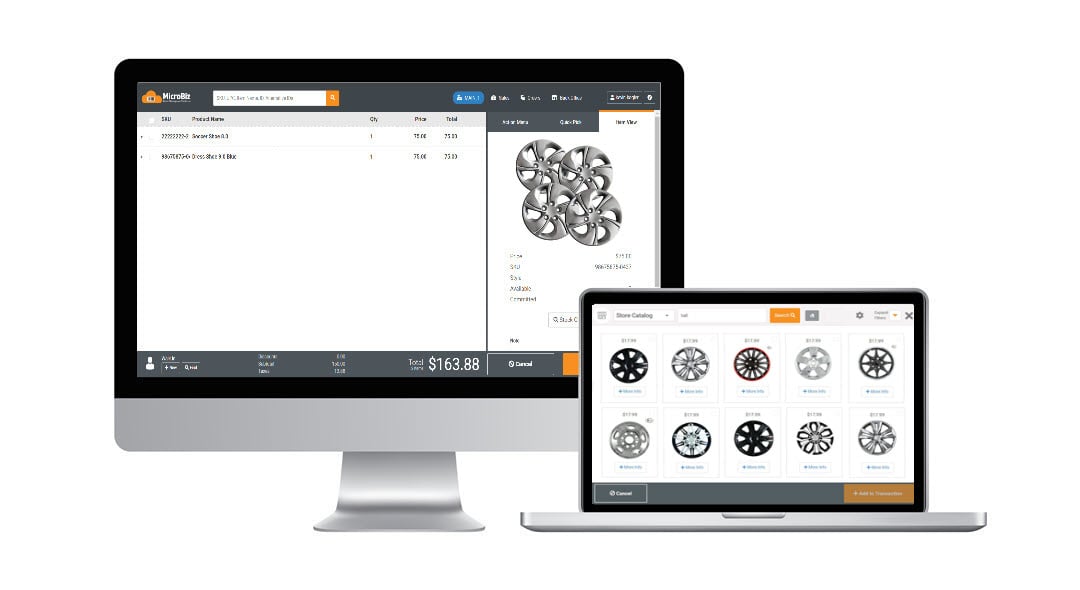
Auto supply or automotive aftermarket retailers stock and sell a wide range of automobile-related products. The best auto supply POS systems manage a large number of inventory items, support multiple price levels for retail and wholesale customers and efficiently manage special orders - or the sale of items not in stock. Many auto parts retailers also offer services and need point of sale software that manages work orders. Automotive aftermarket retailers compete by providing expert advice and superior customer service. Strong customer relationship management features are vital to successfully marketing to customers, such as notifying them when it's time to buy new tires or letting the auto enthusiast know about the latest items for their particular make and model of vehicle
Automotive Aftermarket POS specific features in MicroBiz Cloud include:
- Layaways - collect deposits while holding the item out of inventory.
- Multiple Checked-in Items - provides ability to manage multiple customer-owned items within a work single customer work order record so you can separately work on multiple vehicles owned by an individual or family.
- Quotes and Invoices - with the invoice in progress functionality, you can quote a customer, print the quote, then when the customer comes in to purchase, simply recall the on hold invoice and process the sale.
- Markdown management - easily manage group markdowns, quantity pricing, multi-buy items, promotional pricing and bulk discounting.
- Service item history - Track and view service history of customer-owned items checked in for service work.
- Editable product description on receipts – Ability to edit from the front register the short product description which appears on a receipt. Helpful when selling unique or customizable items.
- Barcode scanning and price labels – Scan manufacturer bar codes or use a supported thermal transfer printer to print barcode price labels.
- Flexible tax rules - allows for virtually any taxing scenario including tax exempt products and tax exempt customers.
- Sales commissions - can be calculated for each item based on the sales amount or the gross profit or track commissions by employee to measure productivity.
- Customer-based group pricing or discounts - based on customer level or group.
- Data confidentiality - Complete control and confidentially of your data, unlike systems offered by automotive parts vendors which give your key suppliers complete visibility into the financial performance of your store operations.
- Store credits - issue and redeem customer store credit.
- Email marketing - deliver targeted campaigns by querying and downloading customer data for use with popular email marketing applications.
- Customer deposits - accept and track customer deposits.
- Ecommerce Integration - Integration with WooCommerce allows you to publish product records to Woo!, sync inventory levels and capture online sales of auto-related products in MicroBiz.
Bulk Add or Update Products and Prices via CSV Imports
You can import your products, customers and inventory levels from your existing point-of-sale by uploading a CSV or Excel file. If your vendor releases a new price list, you can also import price updates in bulk via a CSV import.


Quotes, Estimates and Invoices
You have the ability to print full page quotes, estimates or invoices from the order record – depending on your need. You can also choose whether to print order or line notes on the printed document. Convert quotes into orders with one click to reserve stock and collect payments.
Print Barcode Price Labels
MicroBiz POS supports multiple price tag formats, including tags with bar codes. Price tags can be printed automatically as part of the receiving process, or you can manually reprint tags for price changes. In addition, you can add labels to a queue so that they can be batch printed later.

Credit Accounts/AR Statements
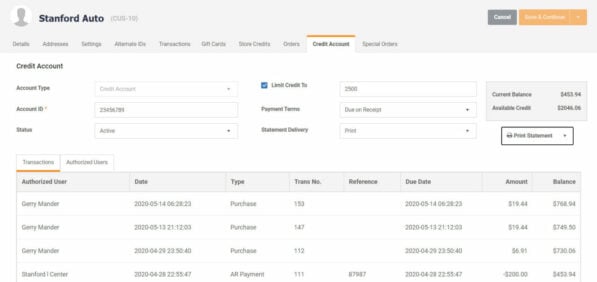
Offer and manage customer credit accounts, including defining authorized users, setting credit limits and payment terms and tracking the current account balance and available credit. Credit account records display all charges to the accounts, payments on outstanding balances and authorized user activity. You can add service charges and issue credits - and bulk print statements.
Customer-based Pricing
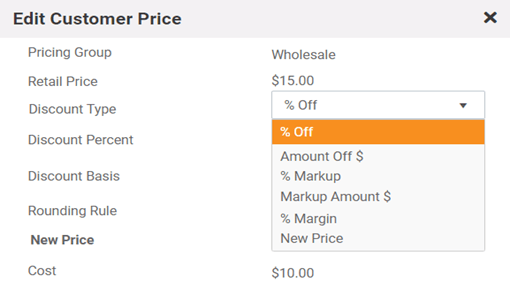
You have the ability to assign customers to a pricing group (retail, wholesale, tier 1, etc.), making the customer eligible for special customer-based pricing and discounts. Prices are adjusted automatically at the register when a customer record with a special pricing group is attached. Customer tax groups allow you to maintain different tax settings for different customers (such as non-profits or resellers).
Special Orders and Backorders
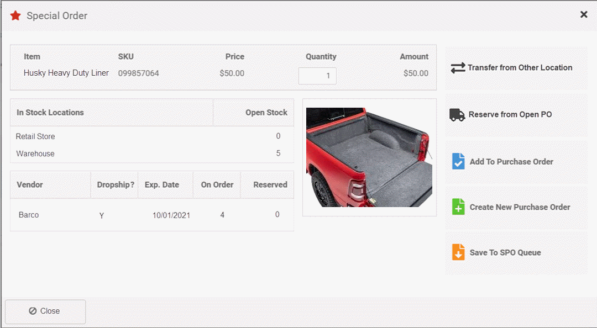
Easily sell items not currently in stock (such as specialty auto parts and truck bed liners). You can mark an item as a special order item at the time its sold, which places it on a list of special order items in the purchasing module. When the special order item (such as an auto part) is received from the vendor, MicroBiz alerts the user that the item is attached to a customer order, so that the customer can be contacted and the specially-ordered item can be set aside for pick-up or shipment.
Repair & Service Department Management
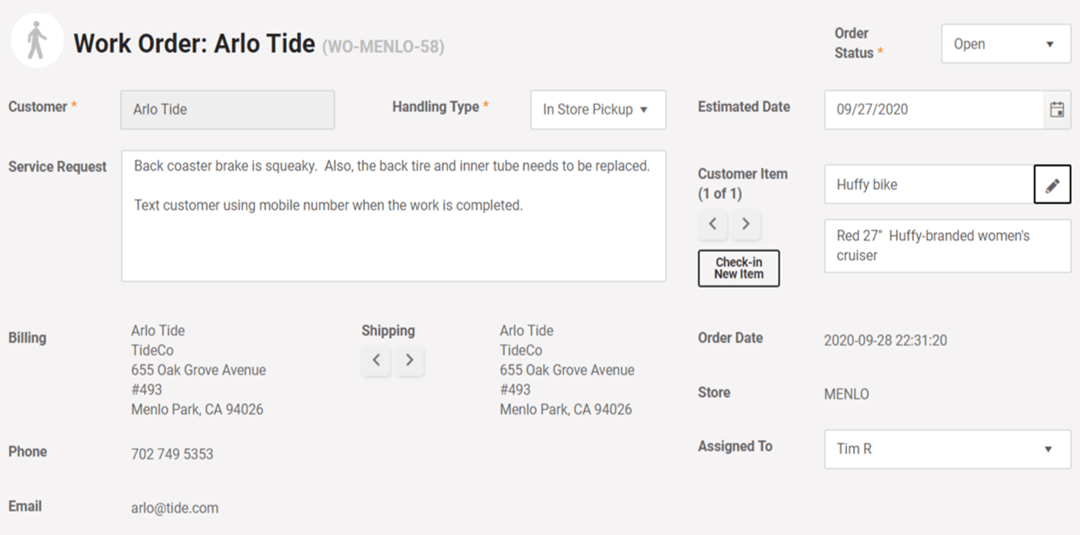
MicroBiz Cloud's work order software allows you to record a description of the work to be done, define a handling method and print claim tags to be attached to the item and/or provided to the customer. You can assign an employee to a work order and enter an estimated completion date to help schedule the work. Customer owned items and the service history on the item is displayed in the product record.
In addition to the automotive aftermarket store POS specific capabilities listed above, MicroBiz Cloud includes the following standard features and functionality needed to manage auto parts retailers:
Register
- Register Quick Pick Keys
- Bar code label scanning
- Transaction holds/recalls
- Returns and Voids
- Split Tenders
- Assign Salesperson to Transaction
- Item and Transaction Discount
- Stock-level Look-up (multi-store)
- Store Credits
- Gift Cards
- Customizable Receipts
- Custom Tenders
- Print or Email Receipts
- Customer Sales History Look-up
- Register Close/End of Day Reports
- Integrated Credit Card Processing
- Advanced Filterable Product Search
- Editable Item Descriptions on Receipt
Integrations
- WooCommerce Integration
- QuickBooks Online Integration
Orders
- Phone Orders/Layaways
- Special Orders (out of stock items)
- Pick-up, Shipping, Delivery Dashboard
- Repairs/Service Dept Management
- Quotes/Estimates/Invoices
- Check-in of Customer Items for Repair
- Deposit Collection and Refunds
- Tax Calculation based on Ship Address
- Backorder Creation and Filling
Customers
- Multiple Shipping/Billing Addresses
- Customer Tax Classes/Tax Exempt
- Credit Accounts/Charge to Account
- Accounts Receivable Statements
- Import Customers via CSV File Import
Store Management
- Flexible and Filterable Reports
- Enforceable Business Rules on Discounts, Returns, Deposits
- Employee Roles and Permissions
- Minimum Deposit Requirements
- Store Transfers
- Support of Contactless Payments
- PCI/PA-DS Compliant Payment Processing
Catalog Management
- Customer-based Pricing/Product Pricing Levels
- Product Tax Classes (multiple)
- Quantity-based Tiered Pricing
- Time-based promo pricing
- Alternate Product IDs
- Fractional Sale Quantities (weight/time)
- Matrix Products with Size/Color/Other Variants
- Product images
- Categories and Sub-Categories
- Print Barcode Price Labels
Multi-store Inventory Management
- CSV File Import of Products & Inventory
- Inventory Adjustment Audit Records
- Purchase Orders/Vendor Shipments
- Minimum Inventory Reorder Points
- Special Order Tracking
Expand Functionality of MicroBiz via Integrations with Popular 3rd Party Apps

Publish register batch financials to QuickBooks Online with one-touch
- Map POS financial activities to QuickBooks GL accounts
- Publish register batch financials to QuickBooks with one touch
- Sync revenue, COGS, inventory values, customer liabilities and payments with QuickBooks
- Create QuickBooks invoice payable from received vendor shipments
- Push POS sales taxes to QuickBooks Sales Tax Center for payment management

<< >>

Integrate your POS system with your Woo! ecommerce site
- Link product records and sync changes in product fields from MicroBiz to Woo!
- Automatically adjust stock levels in Woo! for store sales to avoid sales of items not in stock
- Pull online orders into MicroBiz for order and inventory management
- Capture customer records created online in MicroBiz
Sell Your Inventory Online with Our WooCommerce Integration
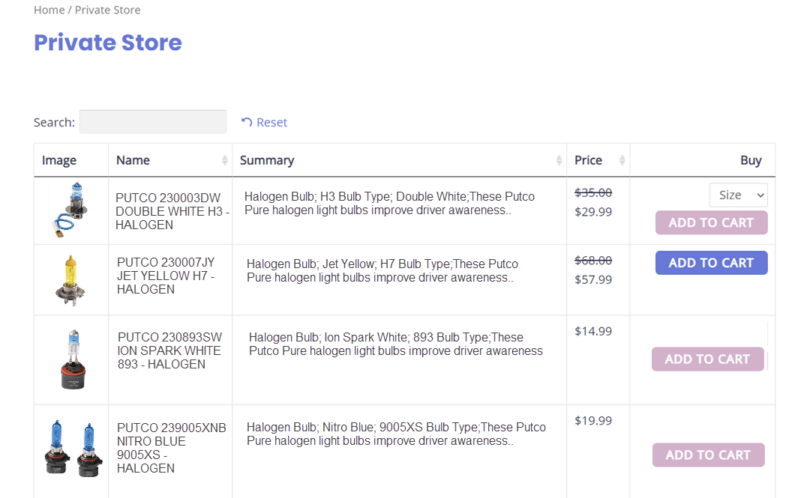
Create customized public or private wholesale ecommerce stores for your best customers using WooCommerce as integrated with MicroBiz. You can offer wholesale pricing for registered customers in a secure password protected private ecommerce site. Display only items curated for a specific customer, such as a fleet manager, corporate customer or restorer. You can completely hide your WooCommerce private wholesale stores from the public, with only your preferred customers being able to access their microsite with a username and password.
The products for sale in the private store can be displayed in an easy-to-use grid format, enabling a wholesale buyer to more easily find products and select variants. You can manage user registration of the employees of your customers - and assign discounts and special prices for items in each private microsite.
Sales in your private online stores are integrated with MicroBiz Cloud, so that online sales are captured and managed in MicroBiz Cloud, and changes in inventory levels sync between your ecommerce site and your store POS/inventory management system.
Frequently Asked Questions
Yes. MicroBiz is designed to manage large product catalogs across multiple categories. You can organize products into categories and subcategories, search by part number or UPC, and import or update large numbers of product records via CSV file. An integrated product catalog with over 1.7 billion items lets you scan a barcode to instantly pull product name, SKU, UPC, and other data into a new product record — making it fast to add new parts and paint products to your inventory.
Yes. MicroBiz provides a real-time centralized view of inventory levels across all store locations and warehouses from any register. You can transfer inventory between locations, set different pricing and costs by store, and manage purchase orders across your entire operation. Multi-store reporting gives you visibility into inventory and sales performance across all locations from one system.
Yes. MicroBiz supports minimum inventory reorder points that help auto-generate purchase orders when stock falls below a set threshold. This ensures you reorder fast-moving parts and paint supplies before running out of stock. When vendor shipments arrive, you can receive them quickly against the original purchase order to keep inventory counts accurate.
Yes. MicroBiz includes a special order module that lets you sell items not currently in stock. You can take a customer order, collect a full or partial deposit, and track the item from the initial sale through receiving and fulfillment. Special orders are automatically linked to vendor shipments when they arrive, and customers can be notified when their order is ready for pickup.
Yes. MicroBiz supports flexible customer-based pricing, allowing you to assign customers to a pricing group — such as wholesale accounts, body shop customers, or loyalty members. Customer pricing can be set as a dollar or percentage discount from retail price, a markup over cost, a target margin, or a negotiated price. Prices are automatically adjusted at the register when a customer record with a special pricing group is attached, so your staff never has to calculate discounts manually.
Yes. MicroBiz includes integrated accounts receivable with full credit account management. You can set credit limits and payment terms for each account, authorize specific employees of a business to charge purchases to their employer's account, and track all charges and payments against the account balance. The system prevents transactions that would exceed a customer's credit limit. You can generate and email full accounts receivable statements showing charges and outstanding balances, making it easy to manage net-30 terms for body shops and wholesale accounts.
Yes. MicroBiz allows you to assign employees to sales transactions and customer orders. Sales are tracked by employee across all locations, providing the data needed to calculate commissions. Reports can be filtered and exported by employee to support your commission calculations and productivity analysis.
Yes. MicroBiz supports printing of invoices, packing slips, and barcode price labels. You can batch print barcode price labels from received purchase orders, making it fast to label incoming parts and paint products. Sales documents can be reprinted at any time. MicroBiz also supports weatherproof barcode price labels using a compatible thermal transfer printer — useful for parts and paint products stored in garages or warehouses.
Yes. MicroBiz has a direct API integration with QuickBooks Online. With one click, you can publish register batch data from all your registers to mapped GL accounts in QuickBooks. When receiving vendor shipments, you can automatically create vendor bill payables in QuickBooks. Sales tax liabilities can also be transferred directly to the QuickBooks Sales Tax Center, reducing manual data entry and keeping your financials accurate.
Yes. MicroBiz supports returns and exchanges, with management settings that allow restrictions to be placed on discounts and returns of specific products. You can control which employees are authorized to process returns, helping to prevent unauthorized returns of electrical parts or opened paint products. Store credits can be issued and linked to a customer record for use on future purchases.
Yes. MicroBiz integrates directly with WooCommerce, the world's most widely used ecommerce platform. You can publish in-store products to your website with a click of a button, and MicroBiz automatically syncs inventory levels between your store and website to prevent overselling. Online orders are pulled into MicroBiz for fulfillment and inventory management, allowing you to manage in-store and online parts sales from a single system.
Want to Learn More?
Try MicroBiz for Free!
Want to test MicroBiz out for yourself? Sign up for a free 21 day trial of MicroBiz including all its features. No credit card required.
Submit a Question or Request
Have a question about MicroBiz software or a request for our sales team? Submit a request directly to MicroBiz using a web form.
or call us at (702) 749-5353 option 2
Schedule One-on-One Online Demo
Want to see how MicroBiz handles workflows or business needs of your store? Schedule a free one-on-one demo with our of our technical sales reps.
Useful Links and Resources:
Auto Care Association — The leading trade association for the $380 billion auto care industry, representing businesses across the entire automotive aftermarket supply chain — from manufacturers and distributors to retailers and service providers. Auto Care provides advocacy, market intelligence, education, and networking resources for its members.
Automotive Aftermarket Suppliers Association — A trade association dedicated to advancing the business interests of automotive aftermarket suppliers. AASA provides industry analysis, strategic insights, government affairs advocacy, and networking opportunities through conferences and peer councils.
Specialty Equipment Market Association (SEMA) — The leading trade association for the $52 billion specialty automotive aftermarket, representing manufacturers, distributors, retailers, auto restorers, restylers, and performance parts specialists. SEMA provides advocacy, business resources, and hosts the annual SEMA Show — the premier trade event for the automotive specialty equipment industry.
Paint, Body and Equipment Specialists (PBES) — A professional community within the Auto Care Association dedicated to businesses in the automotive paint, body, and equipment segment of the aftermarket. PBES provides networking, education, and advocacy specifically for retailers and distributors serving the collision repair and refinish market.
Original Equipment Suppliers Association — A trade association championing the business interests of automotive original equipment suppliers. OESA addresses issues of common concern, advocates for the supplier community in Washington D.C., and fosters collaboration throughout the automotive supply chain.